Category: Web Development

  • 5 Questions People Ask Before Building an AI- Website in 2026

    5 Questions People Ask Before Building an AI- Website in 2026

    Building a website in 2026 is faster and easier than ever because of AI tools. Many people use AI to create layouts, content and full website structures in just a few minutes. This has made it easier for beginners and small businesses to create websites.

    Just because a website can be created quickly does not mean it will work well. Many AI-generated websites look good at first. They have problems when real users try to use them.

    Before using AI to build a website people often ask some questions.

    1. Can AI Alone Build a Functional Website?

    AI can create layouts and suggest designs but it does not really understand what a website is supposed to do. Every business is different. Has different goals, audiences and expectations.

    A good website is not about having pages and content. It is about how everything works. If you do not plan carefully an AI-built website may not be clear. May be hard for users to use.

    That is why people still need to make decisions when building a website. AI can help. It cannot replace careful thinking.

    2. Will an AI-Built Website be Easy for Users to Navigate?

    Navigation is very important for a website. It is often overlooked when using automated tools. AI can create menus and page structures. It does not always make sure everything is connected in a way that makes sense to users.

    Many AI-built websites have many sections, confusing layouts or too many options. This makes it hard for users to find what they need.

    A good way to build a website is to focus on making it easy for users to get around. This means making sure pages are connected in a way and users can move through the website without getting confused. If you want to understand how structured websites are actually built Techtaru Digital, this gives a clearer idea of how navigation and usability are handled in real scenarios.

    3. Is Speed the Thing That Matters in Modern Websites?

    Speed is important for a website. It is not the only thing that matters. A website can load quickly. If it is not easy to use it may still feel slow.

    Performance is also about how buttons respond how stable the layout is and how easily users can interact with different elements. AI tools may make a website load faster. They often miss these other important aspects.

    A good website needs to balance speed and usability. This creates an experience for users. You can also explore more insights on this topic here: Techinshorts

    4. Can AI-Built Websites Handle Growth?

    One of the problems with AI-generated websites is that they may not be able to handle growth. These websites are often created for use without thinking about future needs.

    As a business grows the website may need features, integrations or updates. If the initial structure is not flexible making these changes can be hard and time-consuming.

    Planning for growth from the beginning makes a difference. A flexible website structure allows businesses to expand without affecting performance or usability.

    5. Does Using AI Reduce the Need for Proper Development?

    AI can speed up the process of building a website. It does not eliminate the need for careful planning and development. In fact relying much on automation can lead to generic websites that lack uniqueness and purpose.

    A website should not work properly but it should also provide a good experience for users. This requires planning, structure and attention to detail.

    Using AI tools and a thoughtful development approach leads to results. It allows you to benefit from automation while still maintaining quality and usability.

    AI has changed the way websites are built making it faster and more accessible than before. However it has not removed the need for planning and structured development.

    The effective websites, in 2026 are not just created quickly. They are built with a clear understanding of user needs, performance and long-term growth. By asking the questions and focusing on the basics it is possible to create websites that go beyond basic functionality and deliver a better overall experience.

  • Migrate from MS Access to MySQL: A Comprehensive Guide

    Migrate from MS Access to MySQL: A Comprehensive Guide

    Introduction

    Microsoft Access has been a popular database management system (DBMS) for small to medium-sized businesses, developers, and individuals looking to handle relational data without investing in a full-scale DBMS. It provides an easy-to-use interface with powerful features such as queries, forms, and reports. However, as organizations scale, they often find themselves needing a more robust and scalable database solution. For this reason, many migrate from MS Access to MySQL, a popular open-source relational database management system (RDBMS) that supports larger datasets, provides high availability, and is compatible with a variety of platforms and applications.

    Migration from MS Access to MySQL is a common challenge, as it requires moving data, queries, and objects such as forms and reports. This article will explore the database migration, the bottlenecks typically encountered during migration, and some of the tools available to automate the process.

    Reasons for Migration

    Before diving into the migration process, it’s important to understand why businesses or developers might decide to migrate from MS Access to MySQL. Some common reasons include:

    1. Scalability: MS Access is limited in terms of the number of concurrent users and the size of the database. As a business grows, it may need a more scalable solution like MySQL that can handle larger datasets and many more simultaneous users.
    2. Performance: MySQL is more optimized for performance when handling large volumes of data or complex queries. As MS Access struggles with large databases, MySQL can process data more efficiently.
    3. Cross-platform compatibility: MySQL is compatible with many operating systems including Windows, Linux, and macOS. This makes it an ideal choice for businesses that need to work in a cross-platform environment.
    4. Web integration: Many modern applications and websites use MySQL due to its seamless integration with web technologies. MS Access, on the other hand, is often not compatible with web-based applications, making it harder to scale in the digital age.
    5. Advanced features: MySQL offers features such as stored procedures, triggers, and full-text search that MS Access may lack or handle inefficiently.

    Also read | Game Greblovz2004: Everything You Need to Know About

    Steps to Migrate from MS Access to MySQL

    Migrating from MS Access to MySQL can be a complex process involving data migration, query conversion, and handling application changes. Below is a step-by-step guide to the migration process:

    1. Assess the Current MS Access Database

    Before starting the migration, it is crucial to assess the current MS Access database thoroughly. This includes evaluating:

    • Database Structure: Review tables, fields, relationships, and indexes. Identify any complex relationships that might need adjustments during the migration.
    • Queries: Take note of all SQL queries and stored procedures. Complex queries may need to be rewritten for MySQL compatibility.
    • Forms and Reports: MS Access has a unique user interface with forms and reports. These will need to be either recreated in MySQL or through another application that interacts with the MySQL database.
    • Data Integrity: Verify that the data in MS Access is clean and consistent. You want to ensure that there are no errors or inconsistencies in the database before migrating.
    • Size of the Database: The size of the database is an important consideration as it will impact the tools and approach you use for migration.

    2. Set Up MySQL Database

    Once the assessment is complete, the next step is to prepare the MySQL environment. This involves:

    • Installing MySQL: Ensure that MySQL is installed and properly configured on your system or server. If you’re using a managed hosting service, this will likely already be set up.
    • Create a New Database: Create a new database in MySQL to hold the migrated data. The structure should reflect the tables and relationships from the MS Access database, but certain MS Access-specific features (like auto-increment) may need to be adjusted for MySQL.
    • Database Configuration: Ensure the appropriate character sets, collation settings, and storage engines (e.g., InnoDB) are configured to match the needs of the new database.

    3. Migrate the Data

    This is the core of the migration process—moving data from MS Access tables to MySQL. There are several methods for doing this:

    • Export to CSV: You can export MS Access tables to CSV files, which can then be imported into MySQL using the LOAD DATA INFILE command. While simple, this method can be time-consuming and may not preserve all data relationships or indexing.
    • ODBC Connection: You can use ODBC (Open Database Connectivity) to link MS Access to MySQL. By setting up an ODBC data source for MySQL, you can copy or transfer data directly from Access to MySQL.
    • Data Migration Tools: There are several third-party tools that automate the data migration process, ensuring that relationships, constraints, and other database features are properly transferred.

    4. Convert Queries and SQL Code

    MS Access uses its own flavor of SQL, which can differ significantly from MySQL’s SQL syntax. This can be one of the most challenging aspects of migration, as it often involves rewriting queries. Common issues include:

    • Subqueries and Joins: Some SQL queries in MS Access may use subqueries or joins in ways that are not directly compatible with MySQL.
    • Functions: MS Access has several built-in functions that may not exist in MySQL (e.g., IIf, Nz, etc.). These will need to be rewritten using MySQL equivalents.
    • Stored Procedures: If you’re using stored procedures in Access, they will need to be rewritten in MySQL. MySQL has its own procedural language that differs from Access VBA.

    Tools like MySQL Workbench and SQLyog can help streamline this process by providing tools for converting and optimizing queries.

    5. Recreate Forms and Reports

    MS Access provides a unique interface for building forms and reports, which are often used to display data in a user-friendly manner. In MySQL, forms and reports are not built into the DBMS itself. You will need to migrate these components to a new platform, such as:

    • Web-based applications: You could build forms and reports in a web application using PHP, JavaScript, or another server-side language.
    • Third-party reporting tools: Tools like Crystal Reports or Jaspersoft can be used to recreate and manage reports.

    6. Testing and Validation

    After completing the data migration and converting queries, it’s essential to conduct thorough testing. Some areas to focus on include:

    • Data Integrity: Ensure that all records have been migrated successfully and that no data is missing or corrupted.
    • Query Performance: Test the performance of SQL queries in MySQL. This is a crucial step, as MySQL may perform differently than MS Access, especially when dealing with large datasets.
    • Application Testing: Test the application or interface that interacts with the database to ensure everything works as expected.

    7. Go Live

    Once testing is complete and everything is functioning as expected, you can move forward with the final migration. This will involve setting up your production environment, transitioning any remaining data, and finally switching your application to use MySQL as its backend database.

    Also read | The Truth About Make1M.com and the Millionaire Life – Is It Real or Just a Dream?

    Common Bottlenecks in Migration

    While migrating from MS Access to MySQL is an achievable task, there are several bottlenecks that can make the process difficult:

    1. Data Conversion Challenges: MS Access and MySQL use different data types, which can create compatibility issues during migration. For example, MS Access uses Memo and Text fields, whereas MySQL uses TEXT and VARCHAR. Handling these conversions can be time-consuming and error-prone.
    2. Complex Queries: MS Access queries may use syntax or functions that aren’t directly compatible with MySQL. Converting complex queries can require extensive manual work and optimization.
    3. Application Rebuilding: MS Access provides integrated forms and reports that users rely on. Migrating this user interface to a new system can take significant development effort and may require new technologies.
    4. Data Integrity Issues: When dealing with large datasets, there’s always the risk of data loss or corruption during the migration process, especially when manual methods like CSV exports are used.

    Tools to Automate MS Access to MySQL Migration

    Several tools can help automate or simplify the migration from MS Access to MySQL:

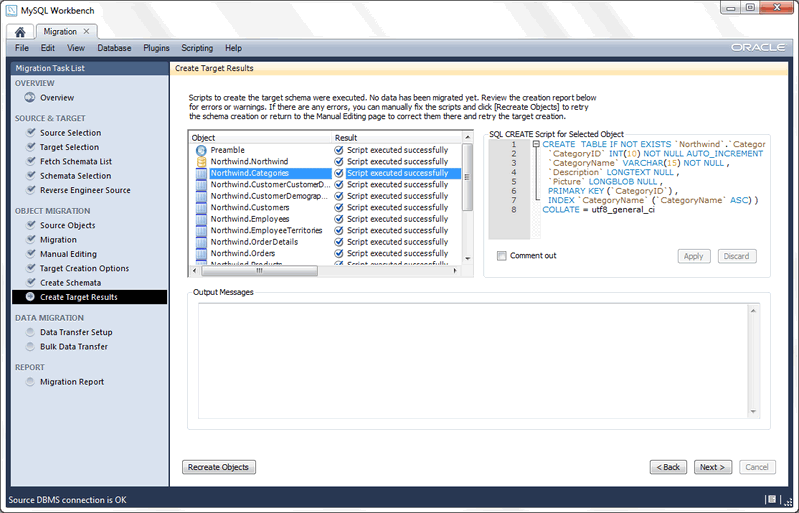
    1. MySQL Workbench: MySQL Workbench provides a comprehensive suite of tools for managing MySQL databases, including migration tools that can help automate the process of transferring data from MS Access.
    2. Navicat for MySQL: Navicat is a powerful database administration tool that offers a migration assistant specifically designed to migrate MS Access databases to MySQL. It can handle the transfer of tables, indexes, data, and even queries.
    3. Access-to-MySQL by Intelligent Converters is a software to automate MS Access to MySQL database migration. It allows users to transfer tables, queries, indexes, and other components with safe data types mapping, avoiding data loss or corruption.

    Conclusion

    Migrating from MS Access to MySQL can be a complex but rewarding process, especially for businesses that need a more robust and scalable solution. By carefully planning the migration, using the right tools, and addressing common bottlenecks, you can ensure a smooth transition. Automation tools such as MySQL Workbench, Navicat and Access-to-MySQL can simplify many aspects of the migration process, making it faster and more reliable. With the right approach, your organization can take advantage of MySQL’s powerful features while leaving behind the limitations of MS Access.

    Suggested reads: Rena Monrovia: When You Transport Something by Car – Everything You Need to Know

  • Help Your Site Speed: Key Systems and Best Practices

    Help Your Site Speed: Key Systems and Best Practices

    In the present computerized age, site speed assumes a critical part in client experience and web crawler rankings. Clients anticipate that sites should stack rapidly, and web crawlers focus on quick stacking locales in their outcomes. Slow sites baffle guests as well as chance losing expected clients and income. Accordingly, upgrading your site speed is principal for online achievement. In this article, we’ll investigate key systems and best practices to support your site speed.

    Enhance Pictures:

    Enormous picture documents are one of the essential guilty parties behind sluggish stacking sites. To enhance pictures, use pressure procedures to diminish document sizes without compromising quality. Moreover, consider utilizing responsive pictures and apathetic stacking to guarantee that pictures are possibly stacked when they come into the client’s viewport.

    Limit HTTP Solicitations:

    Every component on a site page, including pictures, scripts, and templates, requires a different HTTP demand. Limiting the quantity of solicitations can altogether further develop site speed. Consolidate CSS and JavaScript records, lessen the quantity of pictures utilized, and use CSS sprites to join numerous pictures into a solitary document.

    Empower Program Reserving:

    Program reserving permits a client’s program to store static documents locally, decreasing the need to re-download resources on ensuing visits. Design your web server to set fitting store headers for various sorts of records, like pictures, CSS, maximizecache.shop and JavaScript. This guarantees that returning guests experience quicker load times.

    Utilize Content Conveyance Organizations (CDNs):

    CDNs convey your site’s static records across different servers around the world. By serving content from the closest server to the client, CDNs diminish dormancy and further develop load times, particularly for guests situated a long way from your server’s area. Pick a trustworthy CDN supplier and coordinate it consistently with your site.

    Improve CSS and JavaScript:

    Swollen CSS and JavaScript grinds can dial back site execution. Minify and connect CSS and JavaScript records to lessen their size and the quantity of solicitations expected to stack them. Dispose of superfluous code and whitespace to smooth out record conveyance.

    Carry out Server-Side Storing:

    Server-side reserving stores powerfully produced content in a store, permitting resulting demands for a similar substance to rapidly be served more. Use reserving systems, for example, Stain or Redis to store information base inquiries, Programming interface reactions, and delivered pages actually.

    Diminish Server Reaction Time:

    Server reaction time alludes to the time it takes for the web server to answer a solicitation from the client’s program. Upgrade your server setup, data set questions, and application code to limit reaction times. Consider updating your facilitating plan or changing to a quicker web server if essential.

    Screen Execution Consistently:

    Constantly screen your site’s exhibition utilizing apparatuses like Google PageSpeed Experiences, GTmetrix, or Pingdom. These devices give important experiences into regions to progress and assist with following the effect of improvements over the long run.

    All in all, enhancing your site speed is fundamental for conveying a consistent client experience and further developing web crawler rankings. By executing the systems and best practices illustrated in this article, you can essentially improve your site’s speed and execution. Remain proactive in checking and improving your site to guarantee ideal execution in the steadily advancing computerized scene.

  • Offshore Shared Hosting: Essential Benefits Explained

    Offshore Shared Hosting: Essential Benefits Explained

    Intro

    Web hosting is a fundamental part of getting your online presence up and running. However, the kind of hosting you opt for can significantly impact the overall performance of your website and, consequently, the success of your business. While there are several hosting options available, offshore shared hosting has become a favorite for many businesses. This article will discuss what offshore shared hosting is and outline its essential benefits. 

    What is Offshore Shared Hosting?

    Offshore shared hosting is a specialized type of web hosting that involves storing your website’s data on servers located in a foreign country. This hosting method is a subset of shared hosting, a model where numerous users draw from the resources of one server. This shared approach to hosting is particularly favorable for personal websites or small businesses due to its affordability. The ‘offshore’ aspect of this hosting model offers a range of exclusive advantages that include stronger data privacy, potential financial gains, and enhanced content freedom.

    Economic Benefits of Offshore Shared Hosting

    Opting for offshore shared hosting can prove to be a wise financial move for your business. The reason lies in the economical advantages offered by host countries. Primarily, the operational costs, including wages and infrastructure expenses, tend to be significantly less in these regions. Additionally, some offshore locations present favorable tax policies, contributing to even further savings. Thus, businesses can utilize top-notch hosting services, which would typically come at a higher cost, without burning a hole in their pocket. This economical aspect of offshore shared hosting makes it an attractive choice for businesses striving for budget-friendly hosting solutions.

    Enhanced Privacy with Offshore Hosting

    In today’s digitally-connected world, the protection of confidential data is of utmost importance. Many businesses are turning to offshore shared hosting to capitalize on the stringent data privacy regulations offered by many foreign jurisdictions. In fact, numerous offshore hosting locations have rigorous laws in place that prohibit the dissemination of data to external entities, including foreign corporations or governments. This provides a secure environment for your sensitive information, shielding it from potential unauthorized access or exploitation. By leveraging the robust privacy laws of an offshore location, you can ensure your data remains secure, fostering trust among your customers and stakeholders. The decision to go offshore can therefore offer an enhanced level of data protection, helping to fortify your digital operations against unwanted breaches and leaks. This added layer of security is a critical advantage of offshore shared hosting, especially in an era where data breaches have become increasingly common.

    Improved Freedom and Flexibility

    Offshore shared hosting is a liberating alternative to hosting options that can often be constrained by the rules and regulations of certain jurisdictions. This hosting method gives you an amplified scope to articulate your perspectives and display content that might be considered contentious or off-limits in your home country. This means you’re not confined to the restrictions that may apply to web content in your local area, making it an attractive option for individuals or businesses whose content doesn’t adhere to the standards or societal expectations of their homeland. With offshore shared hosting, you can embrace a broader range of expression, ensuring your voice is heard without the fear of infringing on local regulations. It is essential, however, to ensure you comply with the regulations of the hosting country, and respect international laws. Overall, offshore shared hosting breaks down barriers to content freedom, offering a platform for unrestricted self-expression and flexibility.

    Disaster Recovery and Business Continuity

    When it comes to maintaining your online presence, the unexpected can occur at any time – ranging from local natural disasters to sudden server malfunctions. In such circumstances, offshore shared hosting emerges as a reliable strategy for disaster recovery and business continuity. By storing your data on servers located in a different geographical region, the risks associated with localized calamities or technical failures are significantly mitigated. This geographical diversity acts as a shield, protecting your data even when local incidents threaten to disrupt operations. Should an unpredictable event strike, your crucial data remains secure and accessible, ensuring your online business operations continue without interruption. This resilience offered by offshore shared hosting is particularly critical for businesses operating in regions prone to natural disasters or those with unreliable local hosting infrastructure. Therefore, offshore shared hosting is not just about economic benefits or enhanced privacy, but also about ensuring consistent online availability even in the face of adversity.

    Considerations for Choosing Offshore Shared Hosting

    While offshore shared hosting provides a multitude of benefits, choosing a provider should be done with due diligence. It’s essential to weigh the host country’s political stability, as it can impact the reliability of the services. If the country is prone to frequent political upheaval, it may affect the continuity of your business operations.

    Investigate the reputation of the hosting provider. Do they have positive reviews from past and current customers? Are they known for providing reliable uptime and superior customer service? Remember, the reputation of your hosting provider is integral to the smooth functioning of your website.

    Review the provider’s data protection policies and the security measures they have in place. In the age of escalating cybersecurity threats, it’s crucial that your chosen provider takes data protection seriously. They should have stringent security measures to ward off potential data breaches and other cyber threats.

    Take note of the quality of their technical support. Ensure they have a team available to assist you around the clock, especially since time zones may differ. This support can be critical in resolving any potential issues quickly to avoid downtime for your website.

    Lastly, take into account the provider’s service cost. While offshore shared hosting is typically more economical, be sure you’re not compromising quality for price. A lower cost might be appealing, but not at the expense of performance, security, and support.

    In conclusion, choosing an offshore shared hosting provider like offshorededi.com requires a strategic balance between cost and quality. It’s about making sure your business benefits from the economic, privacy, and flexibility advantages offered, without falling short on the crucial elements like stability, security, and support.

  • Top 10 Mobile App Development Companies in UAE 2024

    Top 10 Mobile App Development Companies in UAE 2024

    Well, the UAE is flourishing in every industry, boosting the country’s economy with new and trending innovations. What we see in this perfectly developed country is new technology, everywhere. 

    One of the industries that contributed majorly to the economy of the UAE is app development with over $14+ billion GDP of this country’s economy. The app development companies in the UAE are being appreciated at the global level, for their seamless services and reliability. 

    So, if you are looking for app developers to create a mobile app for your personal use or your business, why not look into the app development companies of UAE? 

    Here we have listed down the top app development companies you can look into, to gain assistance in the journey to success in the upcoming year 2024. 

    List Of The Best 10 App Development Companies In UAE 

    1. Abtach.ae 

    Abtach.ae is one of the major contributors to the app development industry of the UAE. With their top-notch services and reputation on the global platform, Abtach.ae is enabling thousands of businesses to enhance their online presence. 

    By following the development process with trending solutions, Abtach.ae has gathered a team of experts. Whether you want mobile app development services or want to design a website as well, Abtach.ae is at your service. From startups to well-established businesses, they have a track record of completing projects, with the surety of success. 

    1. RetroCube

    In the search for the perfect partner for your success in the digital world, RetroCube is the best option. They are not only known in the UAE but also spreading their skills in the global app development market. With an experienced team of developers, RetroCube offers the services of creating apps with cost-efficiency. 

    RetroCube has expert developers in creating apps for every platform, from iOS and Android as well as Windows, they know how to satisfy customers by providing a digital presence with the services of UX/UI to make the app captivating for a better experience. 

    1. Vention 

    If you want to create an app with a user-friendly interface and high-quality design with an affordable budget plan? Vention is a name you can consider. From the seamless services of development to app design, they are setting a new level of satisfaction in the industry. 

    The team of developers at Vention is also appreciated for creating 3D designs and Gaming apps. by manufacturing intuitive mobile applications with compatible latest technologies. To ensure notable success for their clients, the team of Vention focuses on creating apps with customization services, to tailor their specific requirements and instructions. 

    1. Utility 

    This app development agency is the ultimate solution to all development concerns. Not only the team of Utility holds the experience of creating mobile applications for both platforms, i.e. iOS and Android. The developers in this company are globally known for offering cross-platform development services. 

    From the developers to the designers of this leading app development company, they know how to create quality applications with assurance of security and constant maintenance, to keep the application up-to-date with the latest trends. 

    1. ZCO

    When it comes to creativity with professionalism, ZCO is considered as a robust and reliable app development company. With years of experience, this company holds the title of an award-winning company, with a record of completing 250+ projects. 

    To satisfy each and every customer, ZCO focuses on offering custom app development services with its expertise in native, hybrid, and progressive development services. So, if you want to create a video game app or applications with virtual reality, ZCO is the one-stop company with all of these services. 

    1. Branex 

    This US-based software development company is becoming popular with its utmost services in enhancing its clients’ businesses in the development industry of UAE. The team at this company ensures the services with innovative solutions with creativity and professionalism. 

    They also offer affordable plans, so their clients can avail the comprehensive digital marketing services with their experience of delivering 700+ projects. 

    1. Elluminati 

    Accelerate your business’s online presence, by upgrading your digital marketing with a mobile app. The 24/7 customer service of Elluminati is known for developing and designing mobile applications and websites for the latest and most robust technologies. 

    The team of experts and skilled developers ensures their clients the development services with transparency. They keep their clients up to date throughout the process. 

    1. iCoderz Solutions

    With more than a decade of experience, iCoderz Solution is the go-to place for businesses who are seeking the services of mobile and web applications. As the house of talented developers from all across the world, it specializes in creating applications for different industries, such as ecommerce, health, social media, and gaming applications. 

    The notable services of iCoderz Solution include mobile app development, enterprise solutions, website development, MVP development, and UX/UI design. 

    1. Apphitect 

    Do you want to transform your mobile app development dream to the next level? Connect with Apphitect now. They are best known in this industry for creating applications with innovative solutions. 

    The team of developers at this company stays up-to-date with industry trends to ensure their applications will stand out from others. As the house of experts, they not only entertain their customers with the services of app development but also services like brand designing, UX/UI, and design prototypes.

    1. Blink22

    Everybody wants to have a mobile application that captivates the users to stay engaged with them for the long term, right? Well, don’t worry, and connect with a leading app development company like Blink22. 

    What makes this company exceptional from others? Well, their vision is to provide a seamless app development experience to everyone, no matter the size of the business, they will ensure to be the perfect partner in their journey of digital success. 

    Conclusion 

    In short, the app development industry in a highly developed country like the UAE is crossing the boundaries of success, by providing seamless services of development with cost-efficiency. So, if you want to develop a mobile application with cutting-edge features, take a look at these companies and choose the one that aligns with your needs. 

  • Why Ruby on Rails Is Still a Good Choice in 2024

    Why Ruby on Rails Is Still a Good Choice in 2024

    In the quickly changing world of web development, a robust framework named Ruby on Rails has stood tall since 2005. It’s known as ‘Rails’. With the arrival of 2024, how can Ruby on Rails remain relevant to this day when even a year ago we were anticipating an increasingly rapid pace in which disruptive technologies emerge from seemingly nowhere?

    Setting out to examine why ROR development company is still a viable option for 2024. Rails represents the spirit of web application development that more than simply follows trends. Indeed it is a lifelong friend in modern technology’s ever-changing landscape. 

    What is ruby on rails?

    Ruby is a programming language and one of its most well-known implementations. It’s called “Ruby on Rails”. Among developers, “Ruby on Rails” is simply known as “Rails.”

    In fact, its aim is to make it easier to develop web applications. It does this, by creating initial structures for your code, the database that drives your application and the web pages which will eventually be presented to users. Ruby on Rails runs on a web server and is used to pass information back to client programs (web browsers). As such, it’s called a server-side or backend application.

    Reasons why ruby on rails is still a solid option in the year 2024?

    1. Mature ecosystem and community support

    • Ecosystem maturity

    Over the years, as Ruby on Rails has been steadily updated and improved, it has matured. Refinements from the open-source community have resulted in a stable and reliable framework enjoyed by users. There is a robust ecosystem with well-established tools, libraries and conventions for developers to build upon.

    • Strong community

    Rails is renowned for its welcoming and helpful community. Because of the large amount of developers actively contributing, knowledge and experience abound. This community-run approach means developers can find help, share their knowledge and stay updated with the latest in Rails.

    2. Convention over configuration

    • Accelerated development

    The “Convention over Configuration” principle means developers don’t have to spend endless time setting up files and settings. On the other hand, Rails provides reasonable defaults so developers can concentrate on writing application code. In this way, not only the development process is accelerated but there is consistency across projects.

    • Seamless collaboration

    Conventions ease the work of developers and promote smoother collaboration. Even if team members are unfamiliar with projects, they can quickly understand and contribute. This makes the learning curve shorter for developers who join the project, improving workflow.

    3. Developer productivity and rapid prototyping

    • Readable and concise code

    Built on the elegant Ruby programming language, with its readable syntax. This focus on short and sweet code increases developer productivity, making it easier to maintain and debug applications after deployment.

    • Rapid prototyping

    Its simplicity and high-level abstractions make the framework ideal for rapid prototyping. Teams easily make concepts into functional prototypes. This makes it easier to get earlier feedback on the concept and to make faster iterations in response to user input.

    4. Active record and database abstraction

    • Object-relational mapping (ORM)

    The ROR development company system, active record, makes database interactions easier by mapping table columns to properties of Ruby objects. In this way, developers can use object-oriented programming concepts familiar from other areas when working with databases, rather than relying heavily on SQL queries and significantly improving code maintainability.

    • Database agnosticism

    Rails is also database agnostic, so you can choose the most suitable one for a particular project. This agnostic approach means that developers can switch database technologies without having to completely rewrite their codebase.

    5. Scalability and performance optimisations

    • Modern features for scalability

    It has evolved to meet the demands of scalability. Action Cable handles WebSockets, making it easier to develop real-time applications. In addition, developing server technologies and deployment strategies enhances scalability for large-scale applications.

    • Performance optimisation tools

    The Rails community actively develops and adopts performance-optimizing tools. Options vary from caching strategies to background job processing, and applications may be improved in various ways. This flexibility is essential in today’s big-traffic, high-performance Web applications.

    6. Active development and modernisation

    • Continuous improvement

    At the center of Ruby on Rails, its core team is dedicated to improvement. A regular stream of updates means that Rails is cutting edge on web development trends, security standards and best practices. Its willingness to stay current shows the framework ‘s responsiveness to a fast-changing web development environment.

    • Adoption of modern web standards

    Rails maintains its pace with modern web standards, so that it is in step with today’s trending tools on the Web. This active approach allows developers to take full advantage of the most advanced features and apply industry standards when developing applications.

    What is the future for Ruby on rails?

    With its ability to keep up with the latest development techniques and a strong community, Ruby on Rails (RoR) is fertile ground for promising times. New technologies notwithstanding, the foundations of RoR convention over configuration and a focus on developer productivity make it an enduring framework. 

    Constant attention from the framework’s core team and an active RoR community keeps Rails up-to-date with changing needs within web development. As the need for scalable, high-performance applications increases, Ruby on Rails will continue improving these areas to overcome problems such as real-time processing and changes from monolithic architecture into microservices architectures. 

    In short, the future of Ruby on Rails is simply continued innovation and flexibility, together with a continuing focus on providing developers with an efficient framework by which to develop web applications. Indeed reports that the mean annual salary of a Ruby on Rails developer in the United States is $120,234.

    Conclusion

    In 2024, what makes the ROR development company still strong after all these years? The answer lies in its mighty ecosystem and active community. 

    The framework’s perpetual upgrading, the scalability of its features and extensive gem ecology ensure that it will remain relevant in a world where web development is constantly changing. With efficiency, readability and maintainability the priority for developers and businesses alike though, Ruby on Rails continues to be a pragmatic choice for building quality web applications.

  • How Web Design Birmingham Impacts on User Experience and Branding

    How Web Design Birmingham Impacts on User Experience and Branding

    The impact of web design on user experience and branding cannot be overstated, especially for businesses operating Web Design Birmingham is very important. A website that is carefully crafted with an emphasis on usability and navigation can have a profound impact on user engagement and conversion rates.

    Moreover, a website that is aesthetically pleasing and consistent with a company’s branding can establish a strong sense of trust and credibility with customers.

    Purpose of website creation

    When creating a website, it is essential to keep the target audience in mind. Design elements that improve usability and navigation can reduce frustration and enhance the overall user experience. This, in turn, can lead to increased engagement and higher rates of customer satisfaction.

    However, the benefits of web design extend beyond user experience. A site that is designed in line with a company’s branding can establish a consistent visual identity, helping to build brand recognition and loyalty. By creating a sense of familiarity and trust, businesses can foster stronger relationships with their customers and drive long-term growth.

    It is a critical factor in determining the success of a well-designed website that can significantly improve user engagement and conversion rates, establish a strong sense of trust and credibility, and ultimately drive business growth.

    Web Design is the process of creating and maintaining websites for businesses and organisations in Birmingham, the second-largest city in the UK.

    Web design and branding assist in several ways, such as:

    • It helps to attract and retain visitors by providing a visually appealing, easy-to-use, and engaging website that meets their needs and expectations.
    • It helps to improve SEO rankings by optimising the website for speed, performance, accessibility, and security, making it more visible and relevant to search engines and users.
    • It helps to increase conversions by creating a clear and compelling value proposition, providing smooth and intuitive navigation, and encouraging users to take the desired actions, such as buying a product, signing up for a newsletter, or contacting the business.
    • It helps to enhance brand identity and reputation by creating a consistent and professional look and feel that reflects the business’s values, mission, and personality, and by building trust and credibility with users.

    There are many ways to improve your user experience with web design

    Improve your website speed:

    A fast-loading website can improve user satisfaction, engagement, and retention. To improve your website speed, you can use tools like Google PageSpeed Insights or GTmetrix to analyse your site’s performance and get suggestions for optimization.

    Follow the norms:

    Users expect websites to follow certain conventions and standards that make them easy to navigate and understand. For example, most websites use a standard colour scheme of blue for links and white for text, a standard font size of 16 pixels for body text and 24 pixels for headings, and a standard layout of the header, navigation bar, main content area, sidebar or footer. Following the norms can help users find what they are looking for quickly and intuitively.

    Simplify pages:

    Users don’t have time or patience to deal with complex or cluttered pages that require too much effort or attention. To simplify pages, you can use clear and concise

    language that communicates your message effectively. You can also use bullet points or lists to break down long paragraphs into smaller chunks of information. You can also eliminate unnecessary elements that distract from the main purpose of the page or create confusion.

    Use your metrics:

    Users want websites that deliver value and results based on their actions. To use your metrics effectively, you need to track how users interact with your website using tools like Google Analytics or Hotjar. You need to measure key metrics such as bounce rate (the percentage of visitors who leave after viewing only one page), time on page (the average amount of time visitors spend on a page), conversion rate (the percentage of visitors who complete a desired action), etc. You need to analyse these metrics regularly and identify any areas where you need to improve.

    Testing:

    Users want websites that work well across different devices and browsers without any errors or glitches. To test effectively, you need to conduct user testing using methods such as usability testing (evaluating how easy it is for users to complete tasks on a website), A/B testing (comparing two versions of a web page element such as a headline or an image), etc.

    Make your site searchable:

    Users want to find relevant information on your website without having to scroll through endless pages or tabs. To make your site searchable, you can use keywords in your titles, headings, meta tags, URLs, and content that match what users are searching for. You can hire the services of SEO Glasgow to monitor how users find your site from search engines and identify any issues or opportunities for improvement.

    Also read:

    ApkZub, Download the Latest APKs for Free: Unlock Unlimited Fun Now

    Quizizz: Making Learning Fun and Engaging

  • How Can Software Developers Balance Manual and Automated Testing?

    How Can Software Developers Balance Manual and Automated Testing?

    Testing is a vital part of the software development process. It ensures the integrity and functionality. 

    Software developers face a major challenge in finding the right balance between manual and automatic testing. Both manual and automation testing have distinct advantages but also present challenges for the quality assurance process. 

    Automation testing is fast, repeatable, and scalable, providing rapid feedback and covering repetitive test scenarios efficiently. Manual testing is more human-like and allows for exploratory testing, evaluation of the user experience, and the ability to adapt to unexpected circumstances.

    To successfully release software, it is important to find the right balance between harnessing automation’s efficiency and maintaining the nuanced insight of human testers. 

    Software developers can strengthen their testing strategies by leveraging the strengths of both manual and automated tests. This will ensure robust applications that can withstand users’ real-world testing. 

    Striking the Right Chord: Balancing Manual and Automated Testing in Software Development

    1) Embracing the Speed and Reliability of Automation

    Automated software testing is a key component of the modern lifecycle for software development, providing unparalleled efficiency and accuracy. Its ability to quickly execute test cases and provide feedback on the health and performance of an application is one of its most notable features. 

    Automated scripts can perform repetitive tasks without error, which is a great way to ensure that scenarios covered by the application will be thoroughly covered. This rapid execution speeds up the testing phase and allows for the identification of defects.

    Automated testing is more reliable, adding another strength to the arsenal. Automated scripts are consistent, repeating the same tests with precision. 

    This consistency is essential in regression testing, where the main goal is to ensure that code changes don’t negatively impact existing functionality. This automated approach ensures this verification is thorough and consistent across builds and iterations.

    Scalability is an important attribute of automated tests, making them a good choice for applications with complex architectures and multiple functionalities. 

    Automated tests can scale up as the complexity and size of software projects increase. Scalability is important for large projects where manual testing may not cover the number of test cases.

    The speed and reliability offered by automated testing are a great asset to developers in their quest for effective and efficient quality assurance. Automated tests can be used to streamline testing processes and improve productivity.

    2) The Art of Human Touch in Manual Testing

    Manual testing is a testimony to the value of the human touch in the complex landscape of software testing. 

    Unlike its automated counterparts, manual testing introduces an exploratory and nuanced element that transcends scripted scenario limitations. This art is based on the ability of humans to adapt to changing testing conditions and to bring a qualitative element to software evaluation.

    Exploratory testing is a great way to use manual testing. Testers can leverage their intuition, creativity, and experience to find unforeseen problems. This method is especially useful when testing requirements are ambiguous or constantly changing. 

    Human testers can navigate software naturally, identifying potential pitfalls, usability issues, and areas that scripted tests may not have covered. They can simulate real-world interactions, allowing them to discover subtle nuances automated scripts might overlook.

    Manual testing also excels at evaluating the user experience. Human testers can assess software holistically from the end-user’s perspective by considering factors like intuitiveness, accessibility, and overall satisfaction. This empathetic testing approach ensures the software meets all functional requirements and offers its intended audience a smooth and enjoyable experience.

    Manual testing is known for its adaptability, which allows testers to react quickly to unexpected situations and changing requirements. 

    Human testers can pivot quickly, adapting their testing strategies in real time based on project dynamics and insights. This flexibility is especially advantageous in agile environments, where iterations and user expectations change constantly.

    Manual testing involves complex scenarios relying heavily on domain expertise and human judgment. Human testers can better understand and analyze certain aspects of software functionality. This is especially true for those that involve complex business logic. They can use their context knowledge to identify subtle issues that automated tests may miss.

    3) Crafting a Harmonious Symphony

    To achieve a harmonious balance, manual and automated testing must be orchestrated. This is similar to conducting a symphony in which each instrument has a specific role. Risk-based testing is a key strategy in orchestrating this balance. 

    It’s a systematic approach that identifies and automates the areas of high importance or those prone to frequent change. This automated testing ensures the most critical aspects of an application are tested efficiently and consistently while allowing testers to concentrate on complex and exploratory scenarios.

    Maintaining equilibrium requires a continuous evaluation of your testing strategy. Testing requirements change as software projects progress. 

    Regular reassessment is necessary to ensure the blend of manual and automated tests aligns with current project goals and needs. 

    This dynamic process requires a proactive approach, which allows developers to adjust their testing methods in response to changes in project dynamics, user expectations, or emerging industry trends.

    The collaboration between testing and development teams also characterizes this symphony. Transparent communication helps everyone understand which tests can be automated and require a human touch. 

    Together, developers and testers can identify scenarios for testing that lend themselves to automation. This streamlines the testing process. This collaborative approach reduces friction points and ensures that manual and automatic testing are used effectively.

    The culmination of this collaborative symphony is hybrid approaches, which combine the strengths and benefits of manual and automated testing to create an integrated testing strategy. 

    Combining automated tests with exploratory manual testing to evaluate context and explore repetitive scenarios is a strategic way for developers to achieve a balanced testing approach. 

    This synergy ensures that the testing process does not become a rigid structure but an adaptive and responsive method tailored to each project’s unique requirements.

    A harmonious symphony between manual and automated tests is based on strategic decision-making and continuous evaluation. It also involves collaboration and flexibility. This symphony is where automation and manual testing are seamlessly blended to produce a testing strategy that enhances the development process and ensures robustness in software applications. This harmonious integration is the melodic note that permeates the entire development life cycle as we navigate the complexity of software testing.

    4) Overcoming Challenges, Unveiling Solutions

    Recognizing and overcoming these challenges is important to achieve a successful testing strategy. The maintenance costs associated with automated tests are a significant obstacle. 

    Automation brings speed and efficiency but also requires careful maintenance to ensure the scripts are still relevant and effective for each new software version. Implementing robust practices such as script maintenance, version management, and periodic review is important to avoid automated testing becoming a bottleneck instead of a facilitator.

    Another challenge organizations face is the initial investment needed to implement automated testing tools like LambdaTest. These costs can include tool licenses, infrastructure setup, and training. 

    It is important to understand that this investment has long-term advantages in terms of efficiency, time savings, and increased test coverage. Automated testing is not just an expense but a vital investment for the quality and reliability of software products.

    It is impossible to overstate the importance of human judgment in certain scenarios. Automation excels at repetitive and predictable tasks. 

    However, for certain aspects of testing, such as subjective experiences of users or complex business logic, human test analysts’ nuanced insight and intuition is invaluable. 

    To strike the right balance, it is important to recognize these scenarios and ensure that manual testing does not get overshadowed because of the allure of automation. Human testers have unique strengths and should be strategically integrated into the testing process.

    To overcome these obstacles, organizations need to foster a culture that encourages continuous improvement and adaptability. 

    Automation is a reliable tool when it’s regularly assessed. Additionally, organizations must view automation tools as an investment that will pay dividends over time in faster release cycles, reduced times-to-market, and better software quality.

    5) The Path Forward: Excellence through Integration

    Pursuing excellence is the only way to navigate the complex terrain of software testing. This can be achieved by integrating manual and automated testing methods seamlessly. 

    This integration is more than a technical issue. It’s a holistic approach covering the entire software lifecycle from initial design to deployment.

    This path begins with the understanding that each testing method has its own strengths. Manual testing is a great way to add the human element, which includes intuition, adaptability, and the ability to explore unforeseen avenues. 

    Automated testing excels at repetitive tasks, regression tests, and scenarios requiring rapid execution. To strike the right balance, it is important to understand the context of testing requirements, the nature of the application, and specific goals for each testing phase.

    Risk-based testing illuminates the path to success. This practice directs automated efforts toward critical and high-risk zones while allowing testers to concentrate on exploratory and context-specific scenarios. 

    This targeted approach optimizes resources and aligns testing efforts with the most important areas regarding end-user experience and application functionality.

    This journey is a continuous learning process, and it requires adaptability. What might seem like a perfect balance today may need to be adjusted tomorrow. 

    Incorporating feedback from the testing team, regular assessments of the testing strategies, and keeping up with emerging technologies are essential for ensuring the integration of automated and manual testing remains relevant and effective over time.

    On this path, collaboration emerges as the guiding principle. Working together, sharing insights, and making decisions jointly about what to automate versus what to manually test, the development and testing teams create an environment that allows both approaches to be used cohesively. 

    This collaborative spirit goes beyond individual projects and fosters a culture in which the collective knowledge of the team and their experiences contribute to the refinement and evolution of the overall testing strategy.

    Hybrid approaches are the pinnacle in this integration. They combine the strengths of both manual and automated testing. 

    Combining the speed and precision of automated scripts with the human-centric insight derived from manual tests allows development teams to create a comprehensive testing framework that meets modern software’s multiple demands.

    Conclusion

    The delicate balance between manual and automatic testing is more than a technical challenge. It is also a strategic imperative for software developers to pursue excellence. 

    After exploring the strengths of each testing method, it is clear that their integration will unlock the full potential of an integrated quality assurance strategy.

    This balance requires a nuanced understanding and a proactive, adaptive approach to each testing phase. 

    As a guideline, risk-based testing directs automation towards critical areas and allows manual testing to explore the uncharted territory of user experience or complex scenarios. 

    This integration is based on the continuous evaluation of testing strategy, collaboration between development and testing teams, and a commitment to learn and adapt.

    The pinnacle is hybrid approaches that combine the efficiency and creativity of humans with the intuition of automated testing. These approaches can meet modern software’s varied testing requirements and promote a culture that encourages collaboration and continuous improvement among development teams.

    You may also like to read: 101desires.com

    Locksmith pasadena md servleader

  • Advanced NET Development: Strategies for Angular and React Frontend Integration

    Advanced NET Development: Strategies for Angular and React Frontend Integration

    In today’s software development ecosystem, the seamless integration of frontend frameworks with backend services is paramount. ‘Advanced .NET Development: Strategies for Angular and React Frontend Integration’ offers a comprehensive examination of how two of the most popular frontend technologies—Angular and React—can be effectively coupled with the robust .NET platform.

    This exploration addresses the foundational principles of .NET integration, elaborates on the intricacies of setting up Angular within a .NET environment, and delineates the process of incorporating React into .NET applications.

    It further delves into performance optimization techniques, ensuring that applications not only function flawlessly but also meet the highest standards of efficiency.

    The guide concludes with best practices for maintenance and scaling, ensuring that the applications you build are not only cutting-edge but also sustainable in the long term.

    Understanding .NET Integration Basics

    Commonly, successful integration of Angular and React frontend frameworks with a .NET backend hinges on a clear comprehension of the .NET ecosystem’s fundamental principles and communication protocols. Mastery of .NET architecture is essential, as it encompasses both the framework’s core functionality and its ability to interact seamlessly with varied frontend technologies. The .NET platform is designed to support robust, scalable applications, which makes it an ideal partner for the dynamic and component-based structures of Angular and React.

    Developers must address cross-platform challenges, ensuring that the data flow between client-side and server-side is smooth and secure. This involves leveraging .NET’s interoperability with web services like RESTful APIs, which are pivotal for Angular and React components to fetch and manipulate data. Adeptness in asynchronous programming patterns within .NET is also crucial to enhance user experience and application performance.

    Innovative strategies such as using middleware to bridge the gap between the two domains and employing dependency injection to manage services and repositories are integral to a cohesive .NET integration. The goal is to create a unified system where frontend and backend conversations occur fluidly, abiding by the principles of modularity and maintainability.

    Transitioning from the foundational understanding, the next step involves the practical setup of Angular with .NET, which is a critical phase in actualizing the integration.

    Setting up Angular With .Net

    Initiating the integration process, one must first establish a robust development environment that pairs Angular with the .NET framework. This harmonious alignment is feasible through the strategic use of the Angular CLI, a powerful toolset that streamlines application creation, testing, and deployment. The Angular CLI benefits developers by enforcing consistent coding practices and reducing the time-to-market for new features through its efficient scaffolding and build optimization capabilities.Better Developers

    To attain optimal synergy, Angular must be configured to operate seamlessly with .NET Core, as the latter provides a high-performance, cross-platform framework suitable for building modern, cloud-based applications. Ensuring .NET Core compatibility involves setting up the necessary middleware to enable communication between Angular and .NET Core APIs. This setup typically includes configuring the .NET Core project to serve the Angular application and establishing proxy settings that direct API calls to the appropriate .NET Core endpoints.

    Integrating React Into .Net Applications

    Transitioning to React, a widely-used JavaScript library for building user interfaces, requires a methodical approach when integrating it with .NET applications. The fusion of React’s component-based architecture with .NET’s robust backend capabilities can create a powerful synergy for enterprise-level applications. To achieve this, developers need to understand how to effectively harness React Components within the .NET ecosystem and ensure that the integration supports Server Side Rendering (SSR) for improved SEO and initial load performance.

    Consider the following strategic advantages:

    • Seamless User Experience: By utilizing React Components, developers can craft interactive and dynamic user interfaces that are both responsive and maintainable.
    • Optimized Performance: Integrating Server Side Rendering with React in .NET applications can significantly reduce the time to first paint, leading to quicker user engagement.
    • Scalable Architecture: The modularity of React combined with the scalability of .NET provides a strong foundation for building applications that can grow with your business needs.

    This integration, when executed with technical precision and an eye for innovation, lays the groundwork for a truly modern application architecture. As we delve into the intricacies of this process, it’s crucial to consider performance optimization techniques to ensure that our integrated solution not only functions seamlessly but also operates at peak efficiency.

    Performance Optimization Techniques

    Incorporating several performance optimization techniques is imperative when integrating Angular and React with .NET to ensure the application runs efficiently and effectively. One of the most impactful strategies is lazy loading, a technique that defers the loading of non-critical resources at page load time. In practice, this means that components or modules are only loaded when they are needed, reducing the initial load time and memory consumption. This is particularly beneficial in complex applications with numerous features, as it prevents the overwhelming of network resources and enhances user experience by speeding up the perceived startup time.

    Code splitting complements lazy loading by dividing the application into smaller chunks that can be loaded on demand. It is an innovative approach that leverages modern bundlers and module loaders, allowing developers to pinpoint performance bottlenecks and deliver only the necessary code to the client. By strategically organizing code and utilizing dynamic imports, Angular and React applications become more scalable and maintainable, leading to smoother updates and quicker interactions.

    The synergy between lazy loading and code splitting forms a robust foundation for frontend performance optimization. This sets the stage for a continuous improvement cycle—essential as we transition into discussing best practices for maintenance and scaling.

    Best Practices for Maintenance and Scaling

    As we delve into the realm of maintenance and scaling, it is pivotal to establish a comprehensive strategy that ensures the long-term reliability and efficiency of Angular and React applications integrated with .NET.

    The interplay between robust .NET backends and dynamic Angular or React frontends forms a complex ecosystem where even minor changes can have ripple effects, making it essential to adhere to best practices.

    In the pursuit of optimal application performance and scalability, consider these key practices:

    • Code Refactoring: Regularly revisiting and refining code to improve structure and readability without changing external behavior ensures that the system remains adaptable and easy to enhance or fix.
    • Automated Testing: Implement comprehensive suites of automated tests to validate functionality, prevent regressions, and facilitate continuous integration and delivery, thereby instilling confidence in each deployment.
    • Proactive Performance Monitoring: Continuously monitor application performance to identify bottlenecks or inefficiencies early, allowing for timely interventions that keep the system running smoothly even under increasing load.

    By embracing these principles, developers and architects can craft applications that not only meet the current demands but are also primed to evolve with the ever-changing technological landscape.

    It’s the meticulous attention to maintenance and the foresight in planning for growth that underpin the longevity and success of any sophisticated software system.

    Conclusion

    In conclusion, the seamless integration of Angular and React within .NET ecosystems is pivotal for the development of robust, scalable applications.

    An intriguing statistic from the Stack Overflow Developer Survey reveals that over 30% of professional developers utilize these frameworks, underscoring their ubiquity and importance.

    By adhering to best practices for performance optimization, maintenance, and scaling, organizations can ensure the longevity and efficiency of their .NET applications in a constantly evolving digital landscape.

  • Setting up a Go Development Environment with Sublime Text

    Setting up a Go Development Environment with Sublime Text

    Go or Golang is the programming language that gained the traction of developers for complex web development tasks. It feels like the mix of Java and Python that addresses the modern-day needs of development. The setting up of a Go development environment can be tricky for first-time developers and it is crucial to set the right path of variables. 

    The search for the top Go IDEs rises as developers look to set up the Golang programming development environment appropriately. Sublime Text is the kind of IDE recommended by professional developers to process development tasks flawlessly. Such IDE assists the programmers will have a greater impact on the development process and also enhances the overall code quality. 

    IDEs are meant to save repetitive tasks like testing & debugging, and ultimately save a lot of time for developers. Sublime Text offers appropriate customization to tailor the development environment as per specific preferences. If you’ve been already using Golang then looking for a separate IDE like Sublime Text Editor then configuration or updates need to be done with perfection. The blog highlights the relevant ways to set up a Go development environment with Sublime Text. 

    What are the Pros and Cons of Sublime Text Editor?

    Sublime Text Editor supports multiple languages and has become an attractive point for Go developers. It is the best choice to multi-task across different languages like Java, Python, C++, and others. Moreover, the possibility of complex Go programming language project completion is very prominent with the use of specific plugins & packages. 

    The type of editor can be customized easily with the use of varied settings and configurations to fit the workflows. Golang programming today uses such a type of editor for efficient development tasks. Sublime Text Editor also has features like syntax highlighting, cross-platform support, extensive customizations, multiple cursors, code completion, package manager, and others. 

    Other than the top features of the text editor, let us look into the pros of Sublime Text Editor –

    • Go developers will need minimal resources for faster and lighter text editors. 
    • Customizations of the editor can be done easily with the use of key bindings & custom macros. 
    • Edit multiple program codes swiftly with the use of multi-caret editing. 
    • Plugins can be installed easily alongside packages to complete the Go development projects. 
    • The full-screen mode and split editing support the faster completion of web activities. 

    There can be also some troubles faced by developers while using Golang programming language and let us be familiar with the cons of Sublime text editor – 

    • The Go developers will get controlled debugging support for the tasks. 
    • At the time of multi-tasking with different languages, there will be minimal support for the languages and varied file formats. 
    • It is not an open source editor and licenses are available with relevant payments. 

    Installing and Updating of Go

    To start up the Go programming language activity, the system needs to be updated to the newer version of the language. But, first, remove any older version in the system –

    Sudo rm -r /usr/local/go

    Then download the newer version of Golang from official site and extract it for appropriate installation –

    Sudo tar -C /usr/local -xzf go1.7.1. linux-amd64.tar.gz

    Also, the other option will be to use Golang Version Manager for the installation of the platform and set up the right tools for a website development environment. Next, set the PATH environment by adding the following to ‘.bashrc’ –

    export PATH=$PATH: /ur/local/go/bin

    export GOPATH=$HOME / go

    And, finally, create the desirable developmental workspace – 

    Mkdir -p ~/go/scr/github.com/alexeyza

    How To Setup Sublime Text?

    The setup of Sublime Text Editor for Go development should be completed with the installation of different tools for productive outcomes. If the developer is new to Go development then the task starts with the setup of the development workspace. The setting of the system should run through OSX or Linux commands like –

    echo ‘export GOPATH=$HOME/Code/go’ >> ~/.bash_profile

    echo ‘export PATH=$PATH:$GOPATH/bin’ >> ~/.bash_profile 

    source ~/.bash_profile

    mkdir -p ~/Code/go/src/github.com/wolfeidau

    cd !$

    After the setup of the environment, relevant tools need to be installed for desirable web development tasks. 

    go get -u golang.org/x/tools/cmd/goimports

    go get -u golang.org/x/tools/cmd/vet

    go get -u golang.org/x/tools/cmd/oracle

    go get -u golang.org/x/tools/cmd/godoc

    Also, use the Package Control for the installation of Sublime Text Editor in a specific manner –

    {

     “env”: {

     “GOPATH”:

    “/home/arsham/Projects/Go:/usr/bin/go”,

     “PATH”:

    “/home/arsham/Projects/Go/bin:$PATH:/usr/bin”,

     },

     “comp_lint_enabled”:

    true,

     “ipc_timeout”:

    2,

     “fmt_cmd”:

    [“goimports”, “-srcdir”, “$_dir”],

     “on_save”:

    [

     {“cmd”:

    “gs_comp_lint”},

     ],

     “comp_lint_commands”:

    [

     {“cmd”:

    [“go”, “build”, “-i”]},

     {“cmd”:

    [“golint $_fn”], “shell”: true},

     {“cmd”:

    [“go”, “vet”]},

     {“cmd”:

    [“goconst $_dir”], “shell”: true},

     {“cmd”:

    [“usedexports $_dir”], “shell”: true},

     {“cmd”:

    [“ineffassign $_fn”], “shell”: true},

     ],

     }

    The developers can now save and restart the Sublime Text Editor. It might take a few seconds for the installation and then the developers can start their website development task with the Golang programming language.  

    Specific Way To Build and Run Go Code 

    The Sublime Text can be used to build, compile, and run the codes for specific operations. Use ‘CTRL + B’ or ‘CTRL + 9’ like –

    Package main 

    Import “fmt”

    Func main () {

               Fmt.Println (“hello world”)

    }

    There are also different kinds of plugins to support different Golang projects and also works well with the editor. As mentioned above, try to install the following tools for specific development goals:

    go get -u golang.org/x/tools/cmd/oracle

    go get -u golang.org/x/tools/cmd/goimports

    go get -u golang.org/x/tools/cmd/godoc

    Developers can now start the website or web app development tasks to complete the projects timely and within the specified work environment. 

    Final Thoughts! 

    The selection of IDE like Sublime Text Editor will boost the Go development activities for businesses. It also streamlines the overall coding experience and supports the website’s goals. The unique features of the editor ensure intelligent debugging to support the web development frameworks. 

    Work efficiently with powerful & top-quality text editors to customize your business sites and also follow the best Go development practices. It can be installed easily and developers can start the cross-platform development activities as per expected lines. Hope this has helped you understand the installation & setup of the Sublime Text Editor with simple steps.