Category: Technology

Get to know about the current tech, new update, form of innovation, and how tech is revolutionizing in the market and the industry as a whole. Get the latest news about technology from all around the world. The passionate tech-savvy have so much to share and talk about. We are completely a tech-driven place. Get to know the stories about top companies like Google and Apple and also learn about the small start-ups. How technology is changing and circling around everywhere in some form or the other. 

The new graduates specializing in the field of technology are also welcomed to join our tribe and grow their expertise. It is a platform where all like-minded people can gather up together and start to share their experiences. Study, research, and evolve. Technishorts is a new world of technology. Check out the latest news headlines and select the blog as per your own choice.

  • UK Accounting Software 101: Importance of Data Security in UK Accounting Software

    UK Accounting Software 101: Importance of Data Security in UK Accounting Software

    In the age of digitization, as technologies develop, data security has become a serious concern, especially with software. When you trust accounting software with all your financial information, a data breach could negatively impact the business. The impact could lead to many consequences that may be hard for your business to recover from.

    In such a circumstance, if you understand and know how data security works, you would have a better time ensuring that the UK accounting software you use does not jeopardize your crucial information.

    How Data Security Works?

    Data security protects your digital information from being accessed by unauthorized personnel, theft, or corruption in its complete lifecycle. Data security is a concept that includes every part of information security that may involve UK accounting software. Such data security involves certain procedures and policies that ensure the safety of your information.

    Data security ensures that none of your information gets stolen. When strong data security strategies are implemented, it protects your information from any cybercriminal activity. Also, it protects your data from human error and insider threats.

    Why is Data Security Important for UK Accounting Software? 

    On the most basic grounds, the importance of data security for your UK accounting software arises from the need to safeguard your financial information. No matter which and how many systems you have the software in, they would need the proper data security to ensure that your information does not get misused by any means.

    If you have an accounting firm and use UK accounting software, it becomes much more crucial to safeguard your information and all of your client’s details. You must utilize such software that makes data security one of its top priorities. But alongside that, you would also need to ensure that you are implementing the best data security solutions available to add an extra layer of protection. 

    The primary reasons why data security is crucial for UK accounting software are the following: 

    • Maintenance of Business Continuity

    When the primary software you use considers your data security and ascertains that they use the most significant security solutions, then this security ensures that you can continue your business safely. 

    • Preventing Data Breach

    A good data-secured UK accounting software would ensure that your business does not face any data breach. A data breach is when an unauthorized system tries to breach your software and steal your information. The efficiency of UK accounting software is displayed when it ensures that no data is breached. 

    • Keeping Illegal Access at Bay

    A data-secured UK accounting software ensures that no one can access your information illegally. It maintains the safety of your important information. 

    How Does Data Security Work with an Accounting Software? 

     A UK accounting software assists with data security by containing some core features. These features may involve the following: 

    • Two-factor Authentication

    Generally, any accounting software has two-factor authentication, which provides you with another authentication level during your every login. You can utilize two-factor authentication when you or your team may be utilizing a particular function. 

    • User Permission

    The software also involves user permission that allows you to define tasks your team can perform, access, and approve. 

    • Validation Rules

    Most UK accounting software establishes certain standards for handling and recording data. The security measures ensure that only a few authorized users can utilize the system for a specific process. Based on certain validation rules and business logic to prevent any process from being accomplished without the appropriate sequence.

    Secure Financial Data with UK Accounting Software 

    When concerned about your data security, you can utilize some of the best UK accounting software. They ensure your data security and provide you with several benefits. The Dext accounting software includes the following: 

    • Dext Prepare

    Dext Prepare is a software that extracts and collects data with the best accuracy, which then gets processed to another accounting software that you may have. Dext Prepare simplifies your task and saves you a lot of time. 

    • Dext Commerce

    Dext Commerce is software that helps you manage your data acquired from sales. This software is specifically created for business owners, accountants, and bookkeepers. It may not be accounting software, but it contributes to any of the accounting systems you already have. 

    • Dext Precision

    Dext Precision is another efficient software that assists with your data. Precision specifically assists with providing you with insights about data that may be incorrect or may be missing. It offers you great value and passes it on to your clients. 

    Conclusion 

    No matter which UK accounting software you use, you always have to ensure that the software prioritizes data security. Without the best data security, your financial information is always vulnerable to data breaches, theft, or illegal activity. To ensure that your data remains protected from external and internal attacks, you would need to choose the UK accounting software that is best for your business. 

  • PROTECTION THROUGH RASP SECURITY

    PROTECTION THROUGH RASP SECURITY

    Rasp security refers to the security measures put in place to protect a Raspberry Pi, a small, low-cost computer that is popular for use in DIY projects, from unauthorized access and malicious attacks. A rasp security has measures that include using strong passwords, keeping software and firmware up to date, and configuring firewalls and other security software. The Raspberry Pi’s small size and low cost make it a popular choice for use in a wide range of projects, including home automation, media centres, and even small-scale industrial automation. However, it is important to take steps to secure the device to protect sensitive information and prevent unauthorized access. Thus, below are some benefits of using rasp security.

    • Protecting sensitive information: By implementing security measures such as using strong passwords, configuring a firewall, and using encryption, it is possible to protect sensitive information such as personal and financial data that may be stored on the Raspberry Pi. This can help prevent data breaches and protect sensitive information from falling into the wrong hands.
    • Preventing unauthorized access: By implementing security measures such as using strong passwords, configuring a firewall, and enabling SSH key-based authentication, it is possible to prevent unauthorized access to the Raspberry Pi. This can help prevent malicious actors from gaining access to the device and the network to which it is connected.
    • Maintaining the integrity of the device: By keeping the operating system and software up to date, it is possible to ensure that any known security vulnerabilities are patched and that the integrity of the device is maintained. This can help prevent malware or other malicious software from compromising the device.
    • Enhancing reliability: A secure Raspberry Pi is less likely to be compromised by malware or other malicious software, which can improve the reliability of the device and reduce the risk of costly downtime. This can help ensure that the device is available and functioning as intended at all times.
    • Meeting compliance requirements: If a Raspberry Pi is used in a business or other organization that is subject to regulatory compliance requirements, such as HIPAA or PCI-DSS, implementing security measures can help the organization meet those requirements. 
    • Avoiding legal liabilities: A security breach can cause legal liability, and implementing security measures can help prevent a data breach and avoid legal liabilities.
    • Preventing attacks: Raspberry Pi devices have been targeted by attackers to use in botnets, DDoS attacks, and other malicious activities, by securing the device, you can prevent it from being used in such activities.
    • Improving the overall security posture: By implementing security measures on a Raspberry Pi, the overall security posture of an organization can be improved. This can help reduce the risk of data breaches, unauthorized access, and other security incidents.
    • Protecting IoT devices: If a Raspberry Pi is used as a hub for connecting Internet of Things (IoT) devices, such as smart home devices, implementing security measures can help protect those devices from unauthorized access and malicious attacks.
    • Enhancing privacy: By implementing security measures such as using encryption, it is possible to enhance the privacy of the data stored on the Raspberry Pi and provide runtime application self-protection. This can be particularly important if the device is used for personal or sensitive information.
    • Preventing data loss: By implementing security measures such as using backups, it is possible to prevent data loss in the event of a security incident or hardware failure.
    • Enhancing accountability: By implementing security measures such as logging and monitoring, it is possible to enhance accountability and traceability of the activities on the Raspberry Pi. This can help detect and respond to security incidents more quickly.
    • Improving incident response: By implementing security measures such as incident response plans, it is possible to improve incident response capabilities in the event of a security incident. This can help minimize the impact of an incident and get the device back to normal operation as quickly as possible.
    • Improving security awareness: By implementing security measures, it’s possible to raise the security awareness of the users and any personnel who may have access to the Raspberry Pi. This can help them to identify and report any suspicious activity or potential security incidents.
    • Enhancing brand reputation: Implementing security measures can help protect the reputation of the organization that uses the Raspberry Pi, by avoiding data breaches or other security incidents that can damage the organization’s reputation.
    • Cost savings: Implementing security measures can help save costs in the long term by preventing security incidents, data breaches, or other security-related incidents that can result in costly fines, penalties, legal liabilities, and reparations.
    • Reducing the risk of cyber insurance claims: Implementing security measures on a Raspberry Pi can help organizations reduce the risk of cyber insurance claims by reducing the likelihood of security incidents. This can help organizations save on premiums and other costs associated with cyber insurance.
    • Improving the performance: By securing the Raspberry Pi, the device can perform better and faster as it’s not bogged down by malware or other malicious software that can slow down the device.
    • Scalability: By implementing security measures on a Raspberry Pi, it can be easily scaled up to meet the growing needs of the organization. This can help organizations save on costs and improve efficiency.

    In conclusion, a Raspberry Pi is a small, low-cost computer that is popular for use in DIY projects, but it is important to take steps to secure the device to protect sensitive information and prevent unauthorized access. Implementing security measures such as using strong passwords, keeping software and firmware up to date, configuring firewalls, and using encryption can help protect sensitive information, prevent unauthorized access, maintain the integrity of the device, and enhance the reliability of the device. It’s important to consult with security experts or professionals to assess the specific needs and implement the appropriate security measures. Overall, implementing security measures on a Raspberry Pi can provide a wide range of benefits that can help protect sensitive information, prevent unauthorized access, maintain the integrity of the device, and enhance the reliability of the device, as well as meet compliance requirements and avoid legal liabilities, improve overall security posture, and save costs.


  • Ways To Maximise Your Robot Vacuum Cleaner Efficiency

    Ways To Maximise Your Robot Vacuum Cleaner Efficiency

    A robot vacuum cleaner is a great investment, so keeping it in good working condition is essential. A well-maintained one can help you save time and energy by doing the job for you. If your device is falling short of expectations or has stopped working, here are some ways to help maximise its efficiency. 

    Keep It Clean

    Devices such as a Xiaomi robot vacuum cleaner need regular cleaning.

    • Clean the filter. The filter is the part that traps dust, debris, pet hair, and other things that get sucked up by it.
    • Clean the brushes. The brushes help brush away dirt from hard-to-reach places, such as along walls or corners, so it can be sucked into the bin for later disposal.
    • Keep wheels clean: Keeping your wheels clean means less friction when moving around the furniture, which will result in less noise produced by them!
    • Keep bin clean: Keeping your bin empty will allow more space for new dirt, so make sure there aren’t any leftover food particles on top.

    Use Maintenance Tips

    If your device is not performing as well as it used to, look at the manufacturer’s maintenance tips. These tips are usually posted online and will give you specific instructions on keeping your device working at its best. The information manufacturers can be beneficial because it’s usually very detailed and easy to follow.

    Replace The Brush Roll

    One of the most important things you can do to ensure your system is working at its best is to replace the brush roll when it needs to be replaced. The brush roll cleans your floor, and if it’s worn out, it won’t be able to properly clean your floors as well as they should be cleaned. Therefore, replacing this part every six months is highly recommended so your device will continue working effectively for years and years on end!

    Adequate Suction Power

    It is important to note that suction power is measured in watts. The larger the dust bin, the more suction power it needs. This means that if you have a small home with an only one-floor surface (such as wood or tile), you may need a beginner-level model with a small dustbin because there will be fewer areas for collecting dirt and debris on your floors.

    On the other hand, if you live in an apartment building where many people live on separate floors with different types of flooring materials–such as carpeting vs hardwood–you’ll want to invest in something stronger such as a Xiaomi robot vacuum cleaner so that different types of surfaces can be cleaned effectively!

    Check The Bin Size

    The bigger the bin, the less often you have to empty it, saving you time and effort.

    On average, most models have a capacity of around 1 gallon (3 Liters). 

    How often should you empty your system? It depends on how much dust/dirt builds up over time, but generally speaking, cleaning once every 2-3 weeks is recommended.

    •  Keep it clean. You should always use the manufacturer-recommended cleaning solution and brush roll. If your device has a filter, make sure you change it regularly according to the manufacturer’s instructions.
    • Check the suction power of your machine regularly by running it on an area that has been cleaned recently (such as under furniture). If there is any dust or dirt left behind after vacuuming this area, then you may need to replace some parts inside or buy another machine with more suction power than yours currently has.

    Also Read Interesting Articles At: Tech In Shorts.

  • How full height turnstiles ensure highest level of security?

    How full height turnstiles ensure highest level of security?

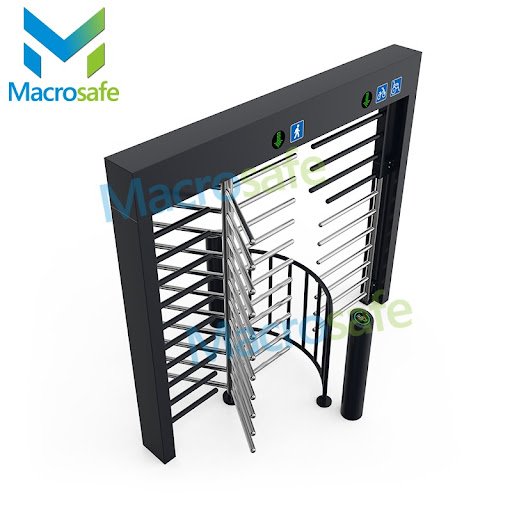
    Having tight security is essential for any facility that has a high volume of people moving in and out, such as factories, construction sites, prisons, and crude oil plants. Full height turnstiles are the perfect addition to any potential weak-spots in your existing security system. With superior access control features compared to regular half height turnstiles, full-height gates provide a higher level of security from both structural design and control technology. This ensures complete peace of mind that only authorized personnel are able to move around freely within your premises. Read on to find out how installing full height turnstiles can take away all your worries about safety & security at any facility you manage!

    1. Ultra tall chassis: The heavy-duty, ultra-tall chassis of full height turnstiles is designed to make it hard for intruders and vandals to breach its security. It stands at least four feet tall, providing robust physical deterrence against any form of unauthorized entry into your premises. 
    2. Sturdy design: A full height turnstile is designed with the most robust materials available to make sure it cannot be broken down or breached. By resisting attempts of destruction, the turnstiles provide a strong first line of defense against intruders. 
    3. Unique structural design:  Unlike a regular half height turnstile, the structral design of full-height gates is unique and highly resistant to any form of tailgating. The structural design ensures that only one person can pass through the turnstile at a time, thereby guaranteeing that no unauthorized people gain access to your facility. 
    4. Locked rotation: The turnstile also features an internal locking mechanism that prevents its rotation when not in use. This means that even if someone manages to climb over the tall chassis, they will be unable to push or pull the turnstile open. 
    5. Electronic control board: The control board of a full height turnstile is designed to control the flow of personnel and prevent unauthorized entry. The control board can decide who has access to the facility and control the rotation of the turnstile accordingly. 
    6. Comprehensive mechanism design:  The latest full-height gate mechanism is made of aluminum alloy material, and the technical wire cutting is more precise and durable than the previous laser-cut iron plate. Using the latest ARM control technology, combined with the 15-degree anti-reverse structure design, it can run quickly, safely and stably.
    7. Advanced detection technology: Full height turnstiles are equipped with advanced detection technology such as infrared, radio frequency identification (RFID), and biometric recognition systems. This ensures that only authorized personnel have access to your premises, further boosting security. 
    8. Automated security alerts: The turnstile system is connected to a centralized control station that monitors and records all entry attempts. In case an intruder attempts to gain access to the facility, the control station will immediately alert security personnel and take appropriate action. This helps ensure that any unwanted access is quickly detected and dealt with.

    In conclusion, full height turnstiles provide an unparalleled level of security by combining a sturdy design, advanced detection technology, and unique structural design, all of which make it difficult for intruders and vandals to breach your premises. They are the perfect addition to any security system due to their superior access control features, making them a must-have for any facility that requires high-level security. With full height turnstiles in place, you can rest assured that your facility is always safe and secure from any unwanted guests. 


  • Machine Learning Development Company – Promising Firms Growth

    Machine Learning Development Company – Promising Firms Growth

    A machine learning development company provides helpful tools for businesses or firms to get insights from raw data. Moreover, machine learning solutions development help employees learn various aspects, like datasets while understanding customs and behaviors. However, no significant programming is necessary for the above factor.

    The constant evolution in machine learning and AI helps businesses or organizations to keep their systems up to date according to customers’ needs. . Moreover, building or incorporating machine learning into existing business procedures is much easier, as most cloud providers offer ML and AI platforms. Hence, AI and machine learning companies help businesses automate their everyday tasks more accurately.

    What is Machine Learning?

    Machine learning (ML) is a part of artificial intelligence mainly focused on computers’ ability to access data, learn other things, and gradually enhance through experience. Nowadays, with the help of machine learning software development agencies, this technology is becoming more valuable in multiple fields, such as voice assistants and search engines.

    Perks of Using Machine Learning Software

    Machine learning software utilizes algorithms that aid in enhancing the precision of complex tasks without human intervention. Following is the list of a few benefits that can be relished by using ML software;

    • Data Mining 

    Examining big data using ML-powered software facilitates extracting practical details from big datasets. A data scientist takes advantage of this information to find new clients, predict future tendencies, and improve business functions.

    • Fraud Detection

    A machine learning development company delivers refined software to catch fraudulent activities in financial trades. Nowadays, the world is adopting digital dealing practices, due to which financial crimes are increasing rapidly. Therefore, machine learning software development becomes a necessity to detect fraud and secure online trades.

    • Web Page Optimization

    ML-based software playas a vital role in web page optimization. It improves the website’s ranking on globally known search engines. Furthermore, this technology allows tracking page traffic and interaction that users find more useful or interesting. Thus, this analysis also helps to enhance web pages’ visual appearance and design, attracting more users.

    • Product Recommendations

    Machine learning algorithms recommend products according to customers’ past purchases and other preferences. Thus, it can help businesses to increase their sales and bring clients’ loyalty to the brand.

    • Finance

    The machine learning system is becoming more and more efficient to enhance financial predictions and risk analysis. Moreover, a company’s ability to invest money in a safe place and secure its assets relies on understanding financial risk.

    • Predictive Analytics

    Top machine learning companies provide software to accurately predict possible outcomes, designs, and client actions. Business owners or entrepreneurs can use these forecasts to make better-informed findings about resource allocation and react to market inventions.

    How Does an ML Agency Help to Increase Employee Engagement?

    Employee engagement plays an important role in evaluating a company’s development. Moreover, it is a business administration idea representing the interest and dedication of employees to their work.

    It is currently more accessible than ever to develop increased employee engagement due to AI and machine learning. Data scientist automation brings a broader spectrum in which computers actively execute tasks and utilize deep knowledge to solve problems. Here’s a closer look at how AI and machine learning agencies help businesses to increase employee engagement in their workplace;

    • Improving Remote and On-Site Employee Engagement

    AI and machine learning monitor the company’s performance precisely, give 24/7 support to employees, and increase professional expansion. There are several methods by which AI and ML are expanding employee engagement in modern businesses.

    Such as:

    1. Boosting diversity in the hiring department lessens the potential for bias
    2. Pulling performance data insights
    3. Providing special options for knowledge and growth
    4. Eliminating human effort from regular duties by providing automation
    • Enhancing Team Collaboration

    Another important benefit is that the team will work together better overall. However, project teams can be created by AI & ML software by locating individuals with the appropriate skills and attitudes. Predictive data analysis can assist businesses in finding staff members who will enhance workplace satisfaction. Thus, by using complex team structures to assess the human experience and complementary attributes, ML technology can improve organizational teamwork.

    • Improving Work Culture by Monitoring Organisation-Wide Performance

    Companies may improve their workplace environments by combining behavioral science and ML process knowledge. Managers can discover elements causing an unstable work environment with the aid of AI and ML. As a result, a machine learning development company rewards employees’ contributions at all organizational levels, which helps develop a stronger culture of teamwork.

    Final Thoughts

    As more businesses incorporate the models into their operations, machine learning will soon be a necessary component of the majority of industries. A machine learning website is essential for helping businesses comprehend how ML models may be applied to meet short, mid, and long-term objectives. Thus, a machine learning development company offers lower prices, enabling startups to use the most recent technologies and expand quickly into new markets.

    Also Read:

    F95Zone: Need To Know F95 Zone About Adult Gaming Community 2021

    How Google Celebrated Pacman 30th Anniversary?

    How to disassemble a porter cable belt sander?

  • [Fixed] No Web, Got Wifi Mistake on Windows 10

    [Fixed] No Web, Got Wifi Mistake on Windows 10

    In the event that your Web Convention settings are not set as needs be, this could prompt issues like the No Web got mistake.

    This issue can be additionally brought about by unplanned changes in IP settings by the client, program establishments, or even broken Windows Updates.

    To fix the No Web, got issue, begin by refreshing the drivers.

    You can likewise have a go at running a devoted investigator from Windows.

    To fix different PC issues, we suggest Restoro PC Fix Apparatus:

    This product will fix normal PC mistakes, shield you from record misfortune, malware, equipment disappointment and streamline your PC for most extreme execution. Fix PC issues and eliminate infections now in 3 simple tasks:

    Download Restoro PC Fix Instrument that accompanies Licensed Advancements (patent accessible here).

    • Click Start Output to find Windows gives that could be causing PC issues.
    • Click Fix All to fix issues influencing your PC’s security and execution
    • Restoro has been downloaded by 560,350 perusers this month.

    One issue that numerous Windows 10 clients experience is a failure to associate with the web in the wake of downloading and putting in new operating system related refreshes.

    For example, you could see a blunder message on your screen that expresses no web, got typically brought about by an invalid IP design.

    For what reason is it showing No Web, Got on Windows 10?

    One of the guilty parties could be that new Windows refreshes you introduced changed the setup settings, so we recorded underneath certain techniques we think could assist you with investigating the issue.

    No Web, got message can keep you from utilizing your Web association. This can be a major issue, and discussing network issues, here are a few comparable issues that clients detailed:

    • No Web got area of interest, on all gadgets, Windows 10, Ethernet, unidentified organization
    • There are different organization gives that can happen on your PC, and all adaptations of Windows can be impacted by these issues.
    • Be that as it may, you ought to have the option to take care of the vast majority of these issues by utilizing one of our answers.
    • No Web got Netgear, TP Connection
    • This issue can show up with any organization connector, and Netgear and TP-Connection gadgets aren’t a special case.
    • Assuming you generally dislike your organization connector, make certain to refresh your drivers and check in the event that that tackles the issue.
    • No Web got Windows 10 PC, on HP PC, ASUS, Dell
    • This message can influence practically any PC brand, and clients announced this issue on ASUS, Dell, and HP.
    • Assuming you have this issue, make certain to check for any applications that can obstruct your organization.
    • Surface Genius No Web got
    • As indicated by clients, this message can show up on Surface Genius gadgets also.
    • To fix the issue, make certain to change your Wi-Fi settings.

    How would I fix the No Web, got On Windows 10?

    1. Run Web Associations Investigator

    • Press Windows Key + I to open the Settings application.
    • Go to the Update and Security area.
    • Select Investigate from the menu on the left and in the right sheet select Web Associations.
    • Pick Run the investigator.

    When the investigator is done, check assuming the issue is still there. Assuming the issue is available, take a stab at running Organization Connector investigator and check in the event that that settles your issue.

    Windows 10 accompanies different investigators that can fix normal issues on your PC, and assuming that you’re disliking No Web, got message, an organization investigator could possibly fix your concern.

    2. Reset Your Association

    • Click on the Wi-Fi network being referred to in the framework plate and It slips hit’s mind. Likewise, turn off any stopped Ethernet link.
    • After totally separating your gadget from that passageway, turn on Quite mode.
    • Restart your gadget and switch off the Flight mode.
    • Associate with the Wi-Fi network in the framework plate once more. Sit tight for a couple of moments before your association returns to ordinary.
    • One more fix for the main thing is resetting your web association.

    3. Update Your Drivers

    Assuming that you continue to get No Web, got message, the issue may be your drivers. Obsolete drivers can make this issue show up, and to fix the issue, it’s encouraged to download and introduce the most recent drivers for your organization connector.

    • That’s what to do, you’ll require a gadget with stable Web access. Presently you really want to visit the maker of your organization connector and download the most recent drivers for your gadget. Subsequent to doing that, move those drivers to your PC and attempt to introduce them.
    • Refreshing the drivers physically can be a dreary errand, yet if you need to refresh everything your drivers with a solitary snap there is computerized programming that can assist you with that.
    • We suggest DriverFix for this occupation as it’s actual quick, dependable and it fixes and updates your drivers naturally.
    • To begin with, Download and introduce DriverFix. When it gets done with introducing it will as of now start and in only a couple of moments you will get a total rundown with every one of the drivers that you ought to think about refreshing.

    The last step is to conclude whether you click on the Update all button on top to refresh every one of the drivers in mass or to introduce them individually. Assuming you go for the subsequent option, you really want to check the singular boxes for every driver and snap on the relating Update button.

    4. Change Your Connector Settings

    • Go to Properties of the Organization Connector and search for a remote connector that is right now running.
    • Look for the Web Convention Variant 6 (TCP/IPv6) under the choices that appear and uncheck IPv6 to handicap it.
    • Click on alright and restart the PC to uphold the progressions you made.

    Assuming that the issue continues, change your connector settings. You can get to the connector settings choice from the Organization and Sharing Center window.

    5. Reinstall the Organization Connector

    • Press Windows Key + X to open the Success + X menu and pick Gadget Administrator.
    • Pick the organization gadget being referred to.
    • Right-click on the gadget whose driver you need to erase and click Uninstall gadget.
    • Make certain to check the Erase the driver programming for this gadget box if accessible. Presently click Uninstall.
    • Then click the Output for equipment changes symbol to reinstall the gadget.
    • Complete the establishment of the driver prior to restarting your PC.

    Take a stab at uninstalling the organization connector and reinstalling it again with the goal that Windows perceives the connector once more on the following startup.

    6. Actually look at Your Antivirus

    As per clients, No Web, tied down message can now and again show up due to your antivirus. Antivirus programming can now and again disrupt your organization association and influence this and different mistakes to show up.

    Master tip:

    • Some PC issues are difficult to handle, particularly with regards to ruined storehouses or missing Windows documents. Assuming that you are experiencing difficulties fixing a blunder, your framework might be to some extent broken.
    • We suggest introducing Restoro, an instrument that will filter your machine and recognize what the shortcoming is.
    • Click here to download and begin fixing.

    To fix the issue, it’s informed to handicap specific elements concerning your antivirus, like its firewall, and check assuming that takes care of the issue. Numerous clients revealed this issue with Comodo Antivirus, so assuming you’re utilizing it, you should watch out for it.

    Assuming the issue is as yet present, even subsequent to debilitating specific elements, you should consider crippling your antivirus altogether. In conclusion, you can likewise take a stab at eliminating your antivirus and check on the off chance that that tackles the issue.

    In the event that eliminating the antivirus takes care of the issue, this may be a great chance to consider changing to an alternate antivirus arrangement.

    There are numerous incredible antivirus instruments available, so you can profit from full-insurance administration for your PC utilizing a lightweight antivirus like ESET Web Security.

    7. Ensure that Expected Organization Elements are Empowered

    • Click the organization symbol in your framework plate.
    • Select the organization name from the rundown.
    • Click on the Change connector choices highlight.
    • Right-click your organization association and pick Properties from the menu.
    • At the point when the Properties window opens, be certain that the accompanying things are checked:
    • Client for Microsoft Organizations
    • Record and Printer Sharing for Microsoft Organizations
    • Connect Layer Geography Disclosure Mapper I/O Driver
    • Web Convention Variant 4 (TCP/IPv4)
    • Dependable Multicast Convention
    • Web Convention Variant 6 (TCP/IPv6)
    • Interface Layer Geography Disclosure Responder

    As per clients, some of the time No Web, got message can show up in the event that specific elements aren’t empowered. Subsequent to empowering these highlights, save changes and check in the event that the issue is settled.

    In the event that the issue actually continues, debilitate your organization connector, hang tight for a couple of moments and betray once more.

    A few clients revealed that Dependable Multicast Convention is pivotal for taking care of this issue, so be certain that this element is empowered. Protests myanmar netblocksfingasengadget.

    It’s likewise worth focusing on that few clients figured out how to tackle this issue just by handicapping Web Convention Adaptation 6 (TCP/IPv6), so you should attempt that also.

    8. Reset your Organization Arrangement

    • Type cmd in Windows Search and snap on Run as manager to begin the Order brief with full honors.
    • At the point when Order Brief beginnings, show the accompanying orders balanced:
    • In the wake of running these orders, your organization design will reset and the issue ought to be settled.

    As per clients, you could possibly fix this issue just by resetting your organization design. This is generally straightforward, and to do it, you simply have to run two or three orders in Order Brief.

    9. Uninstall Tricky Applications

    As per clients, here and there No Web, tied down message can show up because of outsider applications. The normal reason for this issue can be applications that deal with your organization associations.

    Clients detailed that ProSet application caused this issue on their PC, yet subsequent to eliminating it, the issue was totally settled.

    There are multiple ways of eliminating an application, yet to ensure it’s totally gone, we suggest you utilize a committed utility like CCleaner.

    This application shows all applications on your PC, simply select the dangerous one, tick the Uninstall button and you are finished.

    In addition, to ensure there’s no follow left of this application, run the library and PC cleaning choices in CCleaner. From that point onward, once more, you can attempt and check whether you can safely interface with the Web.

    10. Empower the Utilization Arbitrary Addresses for This Organization Component

    • Open the Settings application and explore to Organize and Web segment.
    • Go to Cutting edge choices.
    • In the Arbitrary equipment tends to area make certain to actually take a look at the Utilization irregular locations for this organization.

    In the event that you’re disliking No Web, got message on your PC, you could possibly take care of the issue essentially by changing your organization settings. Subsequent to empowering this component, you want to check assuming the issue is settled.

    Assuming you think we’ve missed a few other supportive strategies, let us in on in the remarks.

  • What Is A Video Management System? All You Need to Know About VMS in 2023

    What Is A Video Management System? All You Need to Know About VMS in 2023


    What is a video management system (VMS)? 

    A video management system (VMS) is a software solution designed to monitor and manage an organization’s video surveillance network. It allows users to securely store, access, and analyze recorded footage from multiple cameras. Many VMS solutions offer features like motion detection and analytics, facial recognition, integration with third-party devices such as access control systems, and remote access for authorized users. 

    The use of VMS has grown in popularity as video surveillance technology has become more advanced. The ability to integrate with existing systems, store large amounts of data securely, and access footage remotely makes it a valuable tool for businesses of all sizes. Additionally, the use of analytics tools and features such as facial recognition can help organizations gain insight into their operations and make better decisions. 

    Video Management System Market Analysis

    According to a latest study by Emergen Research, the global Video Management System (VMS) market size was USD 8.82 Billion in 2021 and is expected to reach valuation of around USD 47.24 Billion in 2030, growing at a CAGR of 20.4%. Revenue growth can be attributed to the increasing adoption of advanced video management systems across a wide range of applications, such as crime prevention, perimeter security, and traffic monitoring. Additionally, the growing implementation of facial recognition technology in VMS solutions is also contributing to market growth.

    Moreover, cloud-based VMS solutions are gaining popularity due to their ability to store, manage, and access video footage from multiple cameras in real-time. This is enabling organizations to optimize their surveillance operations more effectively while also reducing operational costs. Additionally, the emergence of analytics-driven VMS solutions is propelling market growth as they provide organizations with actionable insights into customer behavior and patterns of theft or vandalism.

    The increasing adoption of IoT-enabled VMS solutions is also driving growth in the video management system market. These solutions are enabling organizations to monitor their premises and personnel more effectively, which helps to prevent potential threats from occurring. Additionally, vendors are focusing on developing advanced features such as artificial intelligence (AI)-based analytics and facial recognition technologies to improve their offerings.  These developments are expected to further fuel market growth.

    What are some common features of VMS software programs?

    VMS software programs typically offer a range of features that enable users to effectively manage video recordings. These can include: 

    1. Automated recording and storage – allowing for continued data collection even when the user is away from their computer.
    2. Scheduling options – allowing for recordings to be set up in advance.
    3. Search capabilities – helping users quickly locate specific recordings.
    4. Playback controls – such as pause, skip, and rewind functions.
    5. Video editing features – permitting the modification of recorded videos.
    6. Exporting capabilities – enabling users to share or transfer recordings in different formats. 

    In addition to these standard features, many VMS software programs also offer advanced functions such as motion detection, facial recognition, and object tracking. The range of features available will vary from program to program.

    How does a VMS work?  

    A VMS (video management system) connects to IP cameras and other video systems, allowing users to monitor activities in real time. With a VMS, users can access recordings remotely via web clients or mobile devices. The system also offers tools for enhancing video quality and managing network bandwidth. 

    In addition, the VMS can be integrated with security systems such as access control and intrusion detection to provide an enhanced level of protection against potential threats. Administrators can also use a VMS to set up motion-triggered alerts that are sent via email or text message to alert them of suspicious activity. 

    A VMS can be configured to store recordings for varying lengths of time, allowing users to review events that occurred in the past. This helps ensure that incidents are documented correctly. Furthermore, a VMS can be used to create reports and analyze data from its video recordings. This provides valuable insights into operations and allows administrators to make informed decisions based on the data. 

    How do I install a VMS and what kind of maintenance is required?

    Installing a Video Management System (VMS) requires an understanding of the hardware and software components. In general, a VMS is composed of cameras, recording equipment, as well as a control unit. The installation process typically involves connecting all these components together, setting up the network connection to the system, configuring the software settings and verifying that the system is functioning properly.

    Once installed, a VMS requires regular maintenance to ensure it runs optimally. This includes regularly checking for any software or firmware updates and making sure the network connection is secure. Additionally, monitoring of cameras should be conducted on a daily basis to check that they are performing as expected. Finally, periodic testing of the system should be done to ensure that the recordings are being stored correctly. 

    What are the benefits of using a VMS for businesses and organizations? 

    1. Increased security: A VMS can be used to monitor and record activity within a facility, which can help deter crime and improve overall security.
    2. Improved efficiency: By using a VMS, businesses and organizations can easily view and manage multiple cameras from a single platform, which can help improve operational efficiency.
    3. Enhanced data collection and analytics: A VMS can be used to gather data from cameras, such as traffic patterns, occupancy levels, and other metrics, which can be used to improve decision making and business operations.
    4. Remote monitoring: A VMS can be accessed remotely, which allows businesses and organizations to monitor their facilities from anywhere.
    5. Cost savings: A VMS can help reduce costs by reducing the need for physical security personnel, and by providing data that can be used to make more informed business decisions.

    What are the benefits of using a VMS for homeowners/individuals?

    1. Increased security: A VMS can be used to monitor and record activity around a home or property, which can help deter crime and improve overall security.
    2. Remote monitoring: A VMS can be accessed remotely, which allows homeowners and individuals to monitor their property from anywhere. This allows them to keep an eye on their property and loved ones when they are away.
    3. Smart home integration: Some VMSs can be integrated with smart home devices, such as smart locks and thermostats, which allows homeowners to control their home remotely.
    4. Surveillance and recording: A VMS can be used to record footage of activity around the property, which can be useful for identifying intruders or for providing evidence in case of theft or damage.
    5. Cost savings: A VMS can be less expensive than traditional home security systems and can also offer more features such as motion detection and remote monitoring capabilities.

    How much does a VMS cost and what are some factors to consider when purchasing one?

    The cost of a VMS can vary depending on the features and capabilities of the system, as well as the number of cameras and other hardware that are required. A basic VMS for a small home or business can start at around $500, while a more advanced system for a larger facility can cost several thousand dollars.

    When purchasing a VMS, there are several factors to consider:

    1. Scale: The size of the facility or property and the number of cameras required will affect the cost of the system.
    2. Features: The features required, such as remote monitoring, data analytics, and smart home integration will affect the cost.
    3. Hardware: The cost of cameras, servers, and other hardware will also need to be considered.
    4. Service and support: The cost of service and support, such as system updates, maintenance and repair, will also need to be factored in when purchasing a VMS.
    5. Compatibility: If you already have existing cameras, you will want to ensure that the VMS you purchase is compatible with them.
    6. Scalability: Consider if the VMS is scalable to accommodate future expansion and growth.

    Conclusion

    A video management system is an invaluable tool for businesses and organizations of any size. It provides the ability to easily store, manage and protect valuable video content over time, allowing it to be shared with authorized viewers quickly and securely. With advanced analytics capabilities, a VMS can also provide insights into customer interactions, employee activities, and more. By leveraging the power of video, businesses can achieve greater productivity and improved customer service. With a reliable VMS in place, surveillance and operations are more efficient, making the most of time and resources for maximum impact. Investing in a quality VMS is an important step towards ensuring business success.

  • 6 Most effective Ways to Fix Microsoft Viewpoint Neglected to Erase a Message Mistake

    6 Most effective Ways to Fix Microsoft Viewpoint Neglected to Erase a Message Mistake

    On Microsoft Standpoint, most activities can be performed by either really looking at the Strip or squeezing a basic console easy route. For instance, to erase a message on Viewpoint, select the message and hitthe erase key on your console. While you’re capable with these things, it’s very conceivable the Standpoint actually could toss a mistake.

    Erase microsoft viewpoint email mistake message include picture

    There may be occasions where a message neglects to erase in Standpoint. You see blunder messages, for example,

    The activity fizzled. The informing connection points have returned an obscure mistake. Assuming the issue continues to happen, restart Standpoint.

    Informing point of interaction has caused an obscure mistake.

    Obscure mistake has happened.

    At the presumptive worth, putting a finger on the explanation that caused this error is troublesome. All things considered, this is how you might fix Viewpoint’s mistake message:

    Utilize the console alternate routes to erase

    Out of a few console easy routes you presumably recall, this one will be very convenient. This is the carefully guarded secret:

    Stage 1: Select the directive for erasure.

    Stage 2: Hold down the Shift button on your console.

    Stage 3: Tap the Erase button on the console.

    Stage 4: You ought to receive a spring up message from Microsoft Viewpoint requesting you to affirm the super durable erasure from the email. Click Yes. [pii_email_841b43fada260254c8d3] outlook Error Fix.

    Clear erased things

    One justification for why Microsoft Viewpoint shows a mistake message while attempting to erase a thing may be because of the Erased Things Organizer being full. At the point when the Erased Things organizer is full, you can’t erase Standpoint messages.

    To fix this blunder requires discharging the Erased Things organizer. This is the secret:

    Stage 1: On the Microsoft Standpoint Organizer Sheet, right-click the envelope marked Erased Things.

    Stage 2: From the rundown of choices, select Void Envelope.

    Stage 3: You ought to receive a spring up message from Microsoft Standpoint requesting you to affirm the long-lasting erasure from all things in the organizer. Click Yes.

    Stage 4: Explore to the directive for erasure and tap the Erase symbol.

    Alter the mail hailed for erasure

    A bad mail record could likewise neglect to erase. The most ideal way to erase such a document is by altering it utilizing the means underneath:

    Stage 1: Double tap on the message being referred to open it.

    Stage 2: On the Lace, pay special attention to a field named Move and select the More Move Activities symbol.

    Stage 3: Starting from the drop menu, select Alter Message.

    Stage 4: Type a few characters or eliminate a couple of characters from the email.

    Stage 5: Save the message and close it.

    Stage 6: Explore to the directive for erasure and tap the Erase symbol.

    MARK Things FOR Erasure IN SETTINGS

    This choice just works with Microsoft Standpoint accounts set up with IMAP. This is the closely guarded secret:

    Stage 1: Close Microsoft Standpoint.

    Stage 2: Send off Control Board on your PC.

    Stage 3: Snap on Mail. In the event that you don’t see the Mail choice, change the View By setting to Little symbols or have a go at utilizing the hunt bar.

    Stage 4: On the new menu called Mail Arrangement – Standpoint, click on Email Records.

    Stage 5: another menu called Record Settings ought to open. Double tap your email Name to uncover its properties.

    Stage 6: Snap on Additional Settings.

    Stage 7: Select the High level tab.

    Stage 8: On the menu named Erased Things, guarantee the accompanying things are ticked:

    Mark the things to be erased yet don’t move them consequently. Under typical conditions, when you mark things for cancellation, they are erased for all time after cleansing of the letter drop. How To Fix [pii_email_ccaea0f241ffbc9f81c5] Error Solved. Cleanse the things while exchanging the organizers on the web.

    Stage 9: Snap on alright.

    Utilize the inbox fix apparatus

    Another justification for why a Microsoft Standpoint mail might neglect to erase may be because of the PST record being bad. PST represents Individual Capacity Table and it is the record design in which messages, schedule occasions and different things get saved money on Viewpoint. To fix a PST document, you will require the Inbox Fix Device. This is the secret:

    Stage 1: Close Microsoft Viewpoint.

    Stage 2: Send off Document Traveler.

    Stage 3: Open your C: Drive.

    Stage 4: Select Program Documents.

    Stage 5: Select Microsoft Office.

    Stage 6: Select your Office variant (Office 14, 15, 16 and so on.).

    Stage 7: Double tap SCANPST.EXE to run the record.

    Stage 8: Snap on Peruse to choose the PST document to be examined.

    Stage 9: Snap on Start.

    Stage 10: Snap on Yes when requested to affirm reinforcement creation.

    Stage 11: Close the apparatus after the cycle is finished.

    Stage 12: Re-send off Microsoft Viewpoint and check assuming the issue is settled.

    Restart standpoint in protected mode

    To restart Microsoft Standpoint in Protected Mode, this is the thing you really want to do:

    Stage 1: Hold down the CTRL-key.

    Stage 2: Snap on the Viewpoint Alternate way.

    Stage 3: You will see an admonition exchange box advising you to affirm to send off Standpoint in Protected Mode. Click on Yes. How To Fix [pii_email_89fd2f4da36f84ccbcf2] Error Solved.

    Other viewpoint blunders

    Messages neglecting to erase on Viewpoint is only one of a few blunders you could look while utilizing the application. Other normal mistakes incorporate messages caught in the outbox of Viewpoint or can’t grow envelope blunders.

  • 9005 LED Headlight Bulb: Light the Way With Top  Quality Headlight Bulb

    9005 LED Headlight Bulb: Light the Way With Top Quality Headlight Bulb

    Our reviews are driven by a combination of hands-on testing, expert input, “wisdom of the crowd” assessments from actual buyers, and our own expertise. We always aim to offer genuine, accurate guides to help you find the best picks.

    In my search for the best headlight bulbs, I started by looking for bulbs from well-known and reputable manufacturers, like Sylvania and Philips. I honed in on bulbs that were specifically manufactured to fit common headlight sizes, like H and H bulbs, for a wide range of use cases in different vehicles. In my search, I considered details like longevity, brightness or lumen count, wattage, and expected lifespan. To get a sense of how easy the installation process was for each bulb and how they performed once installed, I looked to user reviews to understand common issues and positive experiences across use cases. Now you can order automotive lighting online from SuncentAuto with free shipping.

    High-performance 9005 LED headlight bulb:

    This two-bulb set is designed to replace headlight bulbs as well as high and low beams and fog light bulbs. It’s a traditional halogen set of bulbs, with a total of, lumens and watts. And its H size works in plenty of different makes and models. But it shines better than your average halogen bulb thanks to its extra vision design, which features robust filament construction and a proprietary gas mixture that improves performance and longevity. These bulbs are also designed to prevent increased glare, allowing you to enhance your visibility over longer distances without adding extra challenges.

    However, if it’s extra illumination and brightness you’re looking for, this standout all-around pick may not deliver. It’s about as bright as your vehicle’s stock bulbs, so it won’t give you much more in the way of brightness.

    With a pair of 9005 LED bulbs installed in your car’s headlight housing, you’ll get a whole lot of value. These uniquely designed bulbs are affordably priced, but they go above and beyond your typical halogen version. Made with an innovative combination of xenon and halogen gasses, they deliver more brightness than your typical halogen-only bulb and make your lights appear extra-white and wonderfully crisp. It’s a budget-friendly way to mimic the bright, clean white lights of luxury vehicles without needing specialized bulbs. And these bulbs draw the same amperage as your factory ones. Plus, they’re backed by a lifetime warranty so you can have years of peace of mind.

    While these headlight bulbs are undeniably brilliant in their brightness, they do fall a little short in one area: distance. Some users note that these bulbs won’t extend your headlights’ visibility down the road, so they’re really a good pick for those seeing extra illumination.

  • Top 4 Benefits of Using Service Robots In Restaurants

    Top 4 Benefits of Using Service Robots In Restaurants

    Technology is the demand of time. Using technology has become crucial for businesses to survive. When it comes to the restaurant industry, technology has been implemented in various ways. Service robots are the most exciting technology being used in the restaurant industry. 

    Using service robots in restaurants has opened new ways of business growth for owners. Service robots offer improved customer services and help to grow business rapidly. 

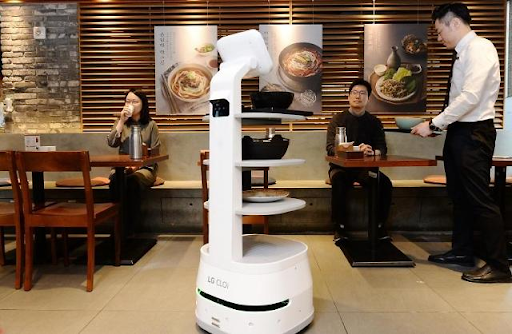
    From cooking to cleaning and mixing drinks to serving food, robots are working in restaurants to complete these tasks. Sometimes, they can also greet guests and guide them to their tables. Service robots are AI-powered automatic machines that can take the responsibility of running your restaurants. 

    What Are Service Robots Being Used in The Restaurants?

    A food service robot is an AI-powered automatic machine that can perform various restaurant tasks. They have built-in AI technology that enables them to perform tasks automatically. 

    Depending on the robot model, they can perform various tasks inside the restaurant. Some models of service robots are capable of cooking, cleaning, and serving food. While some models of service robots are intelligent enough that they can greet customers, direct them to their tables, and note orders. 

    Benefits of Using Service Robots in Restaurants 

    Here are the top benefits of using service robots in restaurants. 

    They Can Assist Human Staff.

    The robots are believed to perform best when integrated with human Staff. They can perform tasks like cleaning, washing dishes, and chopping. They can be very useful during rush hours to reduce the pressure of heavy workloads. 

    Service robots can reduce the burden of human Staff by performing less enjoyable and risky tasks. This makes the staff members stay energetic till the end of the workday. Less job pressure leads to higher job satisfaction among staff members. 

    They Can Perform Dangerous Tasks

    Is cooking an exciting job for you? No doubt cooking is an enjoyable experience. But the fact is that it is dangerous too. You have to deal with dangerous equipment in the kitchen. Humans take risks when handling this equipment, but robots can get jobs done with a very low-risk ratio. 

    Introducing service robots in your restaurant kitchen can greatly decrease accidents as they don’t make errors. Further, robots can’t get hurt while performing their tasks in restaurants. In this way, they provide a safe work environment in the restaurant. 

    They Can Provide High-Quality Results Consistently

    Service robots are automatic machines. They can work 24 hours a day without getting tired of muscle fatigue. This makes robots work consistently on their tasks. So they are more productive as compared to humans. Their consistency will help you get high-quality work and a higher income. 

    They Help to Save Money

    A restaurant owner needs to pay his staff members for their services. On the other hand, robots are a one-time investment that can help you to reduce labor costs for years. They are affordable and reliable restaurant labor. Further, they can prepare the exact amount of food that is required. So there will be no waste of food which will result in saving money.